

Your best KQL practice data disappears after 30 days.
Advanced Hunting keeps a month. The slow intrusion you wanted to study ages out with it, and production was never a safe place to practise anyway: a query that returns nothing does not tell you whether it is wrong or the tenant is clean.
Microsoft gives anyone with a Microsoft account one free Azure Data Explorer (ADX) cluster. No Azure subscription, no credit card, full KQL, about 100 GB of storage. I keep my lab’s Defender data in one.
By the end of this issue you will have your own: eight Defender tables from a real lab intrusion, in a cluster that took me under two minutes to create and under one minute to load. Four steps, and each one ends with something you can check.
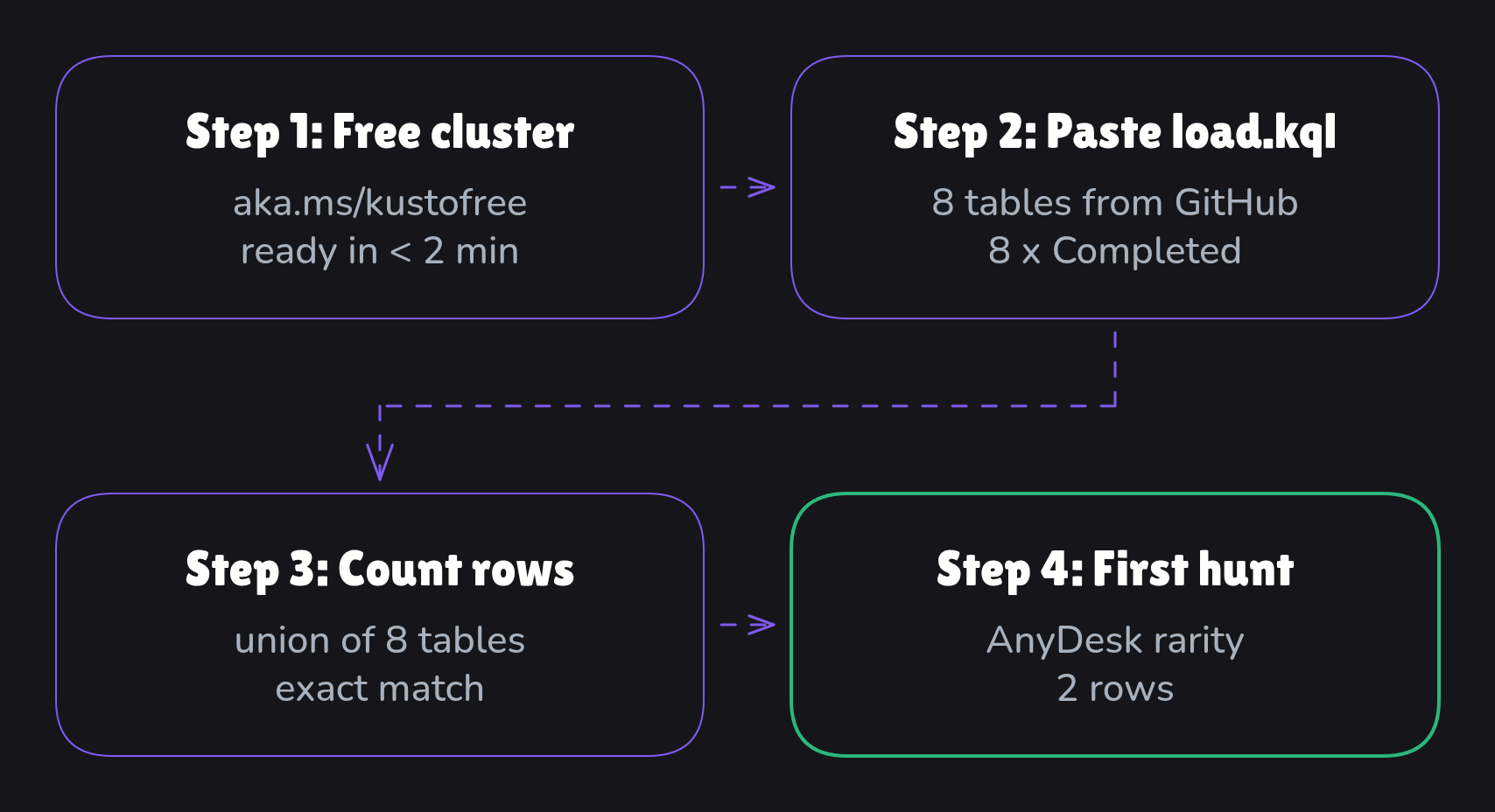
Why a free cluster beats the 30-day window
A real intrusion, not a toy dataset. Keeping your own tenant’s data past 30 days is a different pipeline (export → storage → LightIngest); that one gets its own issue.
Known answers. I already know what happened in this data, so you can check your query against the answer instead of hoping it is right.
Defender’s own column names. A query you write here runs on your live tenant unchanged, apart from the two
letlines that hold the time window.
Step 1: a free cluster in under two minutes
Go to My Cluster and select Create cluster.
Give it a display name, set Database name to
case05, pick a location near you.Accept the terms and select Create. Provisioning took under two minutes in my run.
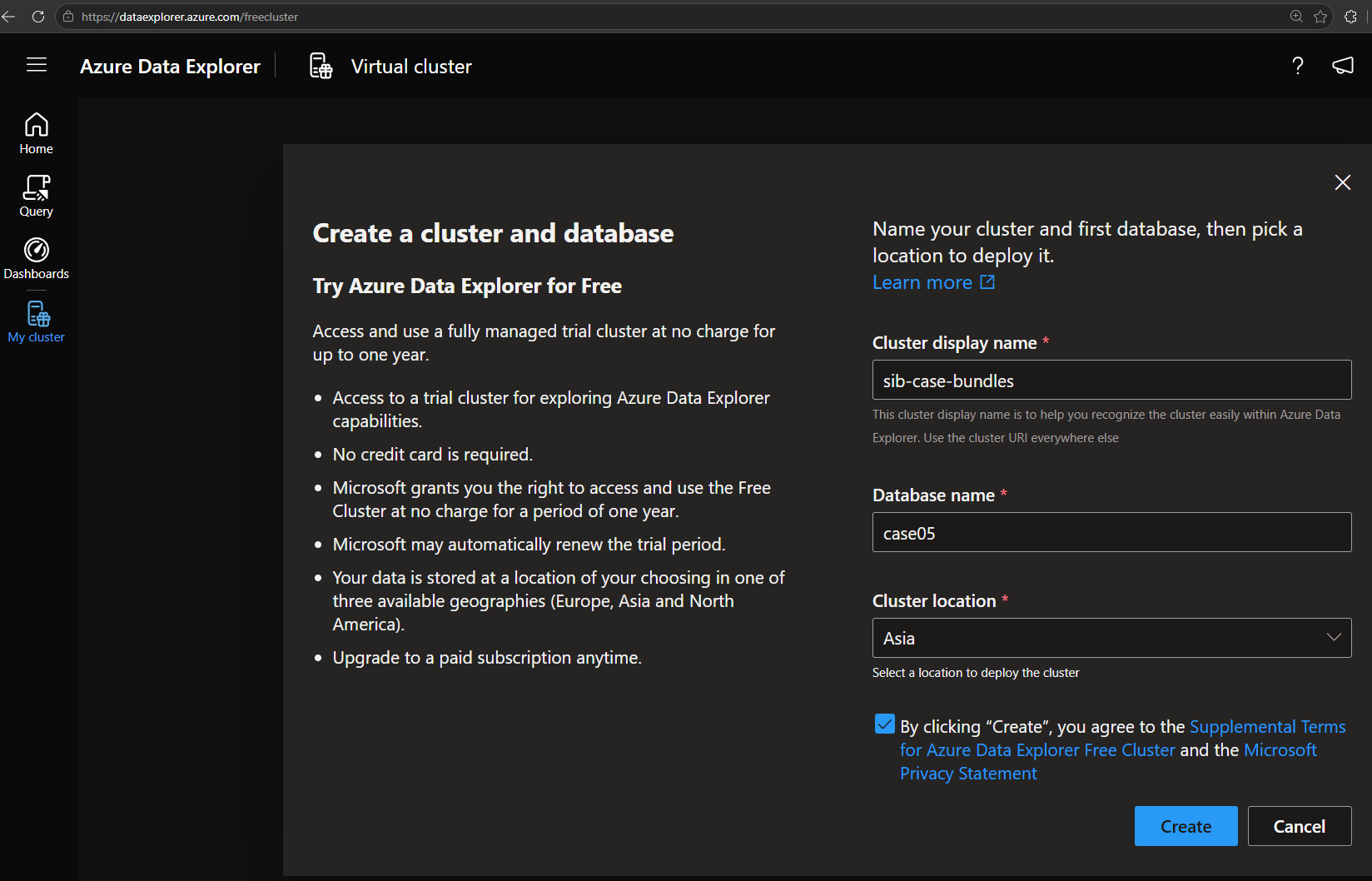
Already have a free cluster? Add a database instead: on the cluster’s overview page, under Actions, pick Create database, select Create on the Create new database card, name it case05, then Create Database. Use a new, empty database: if a database already has Defender tables with these names, the script replaces them.
Step 2: eight tables, one paste, under a minute
The data and the script live in a public repo: github.com/Securityinbits/case-bundles.
Open case-05-anydesk/load.kql, select Raw, and copy all of it.
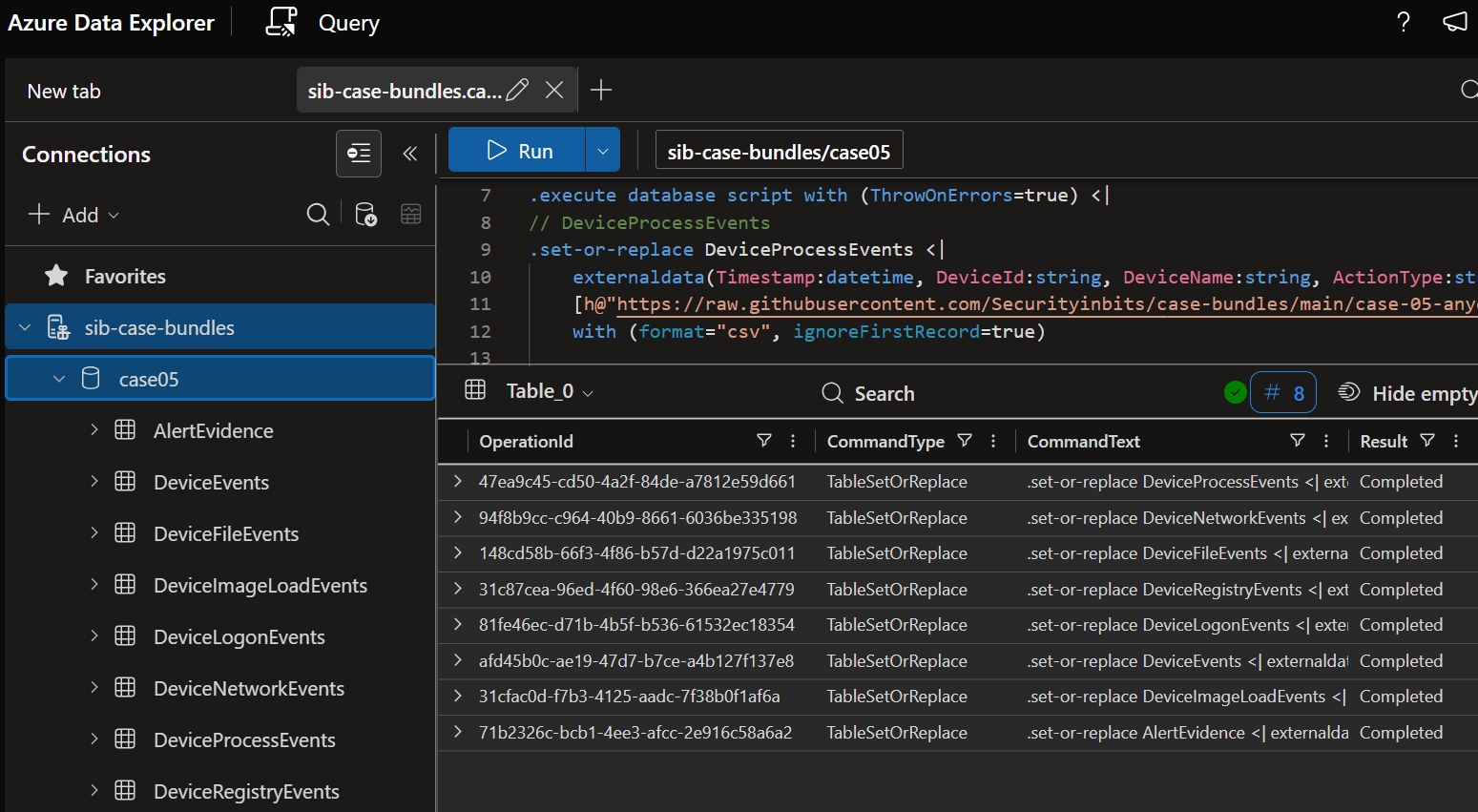
Open the cluster, select Query, and select the
case05database in the left pane.Paste the whole script, select all of it, and Run. It finished in under a minute in my run.
What it does, in plain terms:
externaldata(...)reads a CSV straight from a public URL, with Defender’s column names and types written out..set-or-replacecreates the table and fills it. Run it twice and you still get one copy, not two..execute database scriptruns all eight in order and stops on the first error.
Step 3: the row counts prove it loaded
union withsource=T DeviceProcessEvents, DeviceNetworkEvents, DeviceFileEvents, DeviceRegistryEvents,
      DeviceLogonEvents, DeviceEvents, DeviceImageLoadEvents, AlertEvidence
| summarize Rows=count(), First=min(Timestamp), Last=max(Timestamp) by T
| order by T asc
Your counts should match these exactly:
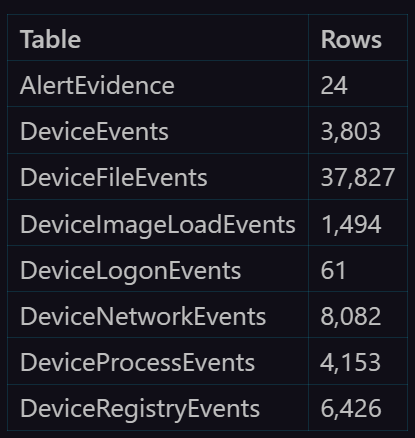
Every date falls on 26 June 2026. A different count means a table did not load fully: run the script again.
Step 4: your first hunt finds a renamed AnyDesk
This is the rarity query from my hunt pack. The data is a fixed day in June, so the time window sits in the two let lines at the top.
let StartTime = datetime(2026-06-26);
let EndTime = datetime(2026-06-27);
DeviceProcessEvents
| where Timestamp between (StartTime .. EndTime)
| where ProcessVersionInfoCompanyName == "AnyDesk Software GmbH" or ProcessVersionInfoProductName == "AnyDesk"
| summarize FirstSeen=min(Timestamp), LastSeen=max(Timestamp), Hosts=dcount(DeviceId),
            HostList=make_set(DeviceName,10), Users=make_set(AccountName,10)
    by FileName
| where Hosts <= 3
| order by Hosts asc, LastSeen desc
Expected: two rows. Invoice_Viewer.exe on one host, AnyDesk.exe on the other. The same AnyDesk binary under a name that is not its own, on one box. That is what rarity catches.

On your own tenant, change the two let lines to ago(30d) and now() and the same query runs live.
Want more practice before next week? The rest of my hunt pack runs on this same data. In each query, replace the Timestamp > ago(...) filter with Timestamp between (datetime(2026-06-26) .. datetime(2026-06-27)).
That was one query on one table. Next Wednesday: the full AnyDesk intrusion as a hunt exercise. Two workstations, an attended and an unattended install, five things to find, from easy to hard, and the worked answers. The answers are for subscribers, and subscribing is free.
If this was useful, forward it to whoever on your team is learning KQL. That is how the next defender finds it.