

An installer landed on a workstation from a browser download. The signature checked out: CN="ConnectWise, LLC", issued by DigiCert Trusted G4. It was a real ScreenConnect client doing exactly what a ScreenConnect client does.
It was also the whole attack.
That is the problem in one line. The maliciousness was in who owned the instance, not in the binary. The attacker did not repack anything, did not steal a certificate, did not need a zero-day, and did not need AI to do any of it. They signed up for a ScreenConnect cloud instance, built a client, wrapped it in a lure, and let ConnectWise sign it for them.
Huntress put ScreenConnect at 74.5% of the abused remote-access tools they see, ahead of RDP, LogMeIn, TeamViewer, Atera and the rest. So I detonated two real samples and hunted them on both stacks I run, to find out what the telemetry actually holds, which queries actually fire, and which ones only look like they do.
The second sample then did the thing that changes how you hunt this tool. It did not drop one implant. It dropped two, and they were not alternatives.
The first was the vendor-signed client talking to ConnectWise’s own cloud relay, and it is allowed to look like legitimate software because looking legitimate is its entire job. Roughly nine minutes later a second one appeared, pushed by hand through the first, dialling a relay the operator owns outright. That one shipped a config file that switches off the tray icon, the connect notification and the banner telling the user they are being watched. One implant to get in. One to stay, built to be invisible while it does.
Everything below is aimed at catching both, because remediating the one your alert fired on leaves the second one installed as a service, dialling a relay you have not seen yet.
Plenty has already been written about ScreenConnect abuse, including about clients that arrive correctly signed, and the best of it is linked further down. What I can add is the endpoint view underneath it. This is AI-assisted, human-validated detection, proven on real lab telemetry: two samples, dual-stack across Microsoft Defender (KQL) and Elastic (ES|QL), every query and every alert pulled from the live stores rather than from memory. Including four places where I had it wrong and the telemetry corrected me, and the log I had not collected that turned out to name the operator on the keyboard.
How it lands: a lure, a rented instance, and a real signature
Both samples arrived the same way, and it is the same way most of them arrive: a fake update page, a poisoned search result, a brand-impersonation lure. A lure page auto-redirected to an attacker-controlled ScreenConnect cloud instance, which served a genuine, ConnectWise-signed client pre-baked with its own launch parameters. Sample 1 came off hxxps://eventvenue[.]ink/view/windows_download.php, a “Blue Mountain” eCard brand impersonation that auto-downloaded after three seconds. Sample 2 came off a second lure, a fake insurance-document page.
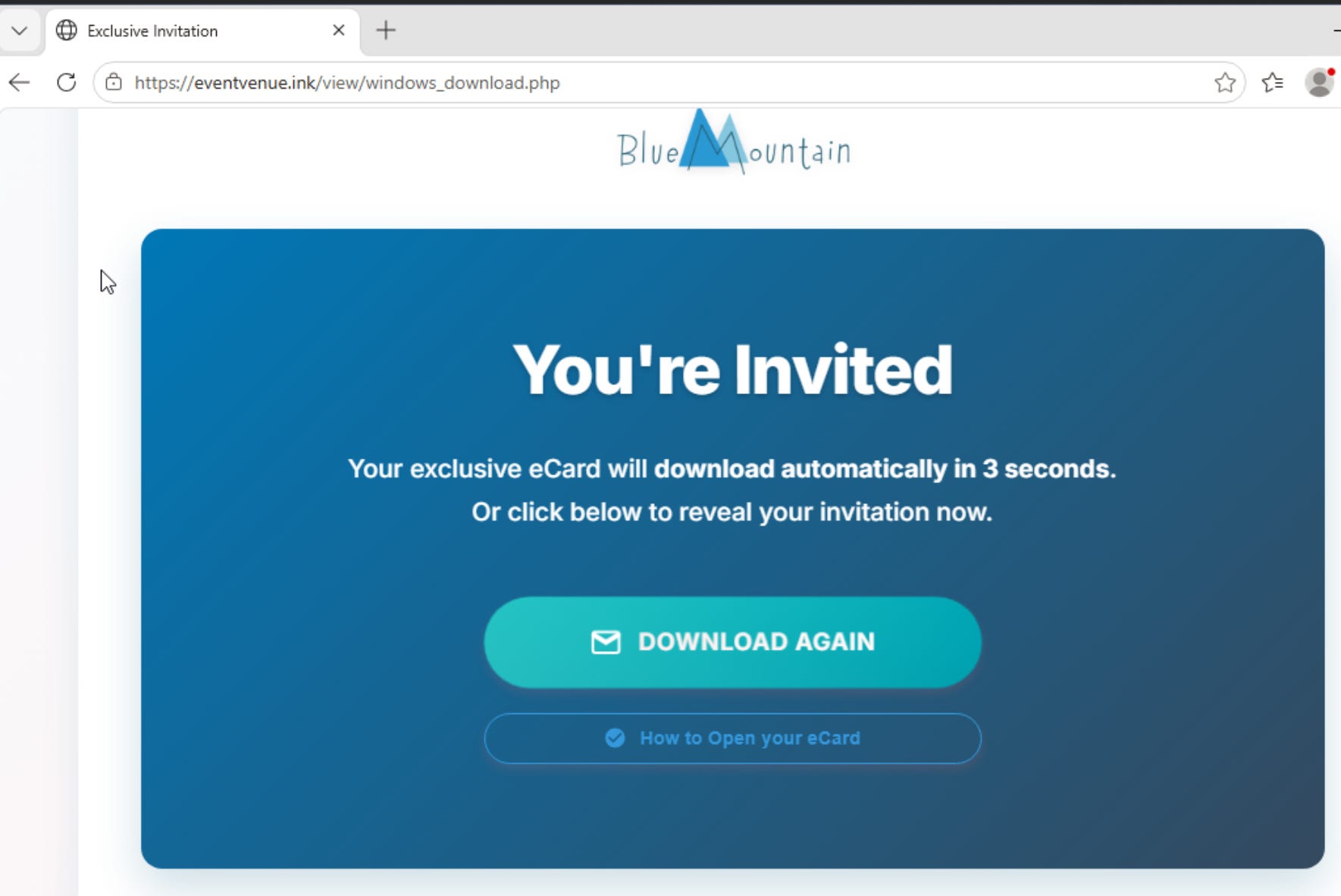
The download host and the relay host share no name
The file the lure served came from the attacker’s own cloud tenant, hxxps://westville[.]screenconnect[.]com/Bin/ScreenConnect.ClientSetup.msi?e=Access&y=Guest. Here is the first trap. Same ConnectWise tenant each time, two unrelated-looking DNS names each time:

Nothing on the endpoint links them except the h= launch parameter and Defender’s FileOriginUrl field. A hunt that pivots on the relay domain alone never reaches the delivery host, and a hunt on the delivery host never reaches the relay. Collect both or you get half the infrastructure.
The trust field would have dropped both samples
Defender did flag sample 2: its antivirus convicted the installer on write as Trojan:Win32/Sonbokli.A!cl, and its behavioural side independently raised Uncommon remote access software on the client. I turned real-time protection off deliberately to watch what the sample did next.
What the signature check would not have done is stop any of it. Both samples were validly signed by ConnectWise LLC, DigiCert Trusted G4. The instinct to filter on SignatureStatus != "Valid" or code_signature.trusted == false would have dropped both samples outright. A cloud-built client is the vendor’s own file. There is nothing to be unsigned about. A file can carry a valid vendor signature and a malware verdict from the same product at the same moment. An AV conviction is a control to have switched on. A trust field is not a hunting predicate. The rest of this piece is about the second claim.
Hunt it: provenance, vendor identity, and the relay, not trust and not the path
If a valid vendor signature is the normal case rather than the exception, what is left to key on? Five things that held on real telemetry.
1. Provenance is the earliest anchor, and it is Defender-only
Defender’s FileOriginUrl carried the full westville[.]screenconnect[.]com download URL, captured at write time, before anything executed. It survives a rename. Elastic recorded the file event but has no origin equivalent at all. Earliest, rename-proof and unique to one stack is what makes it the first anchor rather than a nice-to-have.
// ScreenConnect installer arriving from the internet, with its download origin
let lookback = 30d;
DeviceFileEvents
| where Timestamp > ago(lookback)
| where FileName has "ScreenConnect" or FileOriginUrl has "screenconnect.com"
| where isnotempty(FileOriginUrl)
| project Timestamp, DeviceName, FileName, FolderPath, FileOriginUrl, FileOriginReferrerUrl, SHA256
westville served the MSI, screamingacresmi the EXE.Three origin fields sit on that row, and they are not equal:
FileOriginUrl: the attacker’s tenant, captured at write time. The anchor.FileOriginReferrerUrl: the page the user was standing on when the download fired,hxxps://eventvenue[.]ink/for sample 1 andhxxps://parvellainsurance[.]com/for sample 2. Take it with the first: one field gives you the tenant, the next gives you the lure that sent them there, and together they are the whole delivery chain from one file event.FileOriginIP: empty on every one of the 22 rows in my tenant with a populatedFileOriginUrl. It looks like a free extra column and is not one.
What this does not catch: an installer renamed to something innocuous and pulled from a self-hosted server, where neither the filename nor the URL says ScreenConnect. No origin predicate covers that. The bigger limit: the second implant never touched a browser, so it has no FileOriginUrl to find. The origin fields catch stage one and are structurally blind to stage two.
2. Match on vendor identity, never on trust status
This is the counter-intuitive one, and it is the lesson of the whole case. The valid ConnectWise signature that defeats the signature-status filter is the exact field that catches the tool, if you read it the other way.
Do not ask “is this untrusted.” Ask “is this a remote-management vendor’s binary running where one should not be.”
That is what caught both samples on Elastic. Match on process.code_signature.subject_name being a known RMM vendor. Same attribute as the naive filter, opposite polarity.
FROM logs-endpoint.events.process-*
| WHERE @timestamp > NOW() - 30 days
| WHERE event.action : "start"
| WHERE STARTS_WITH(process.code_signature.subject_name, "ConnectWise")
| STATS firstseen = MIN(@timestamp), events = COUNT(*), paths = TOP(process.executable, 5, "asc")
    BY host.name, process.name, process.code_signature.subject_name, process.code_signature.trusted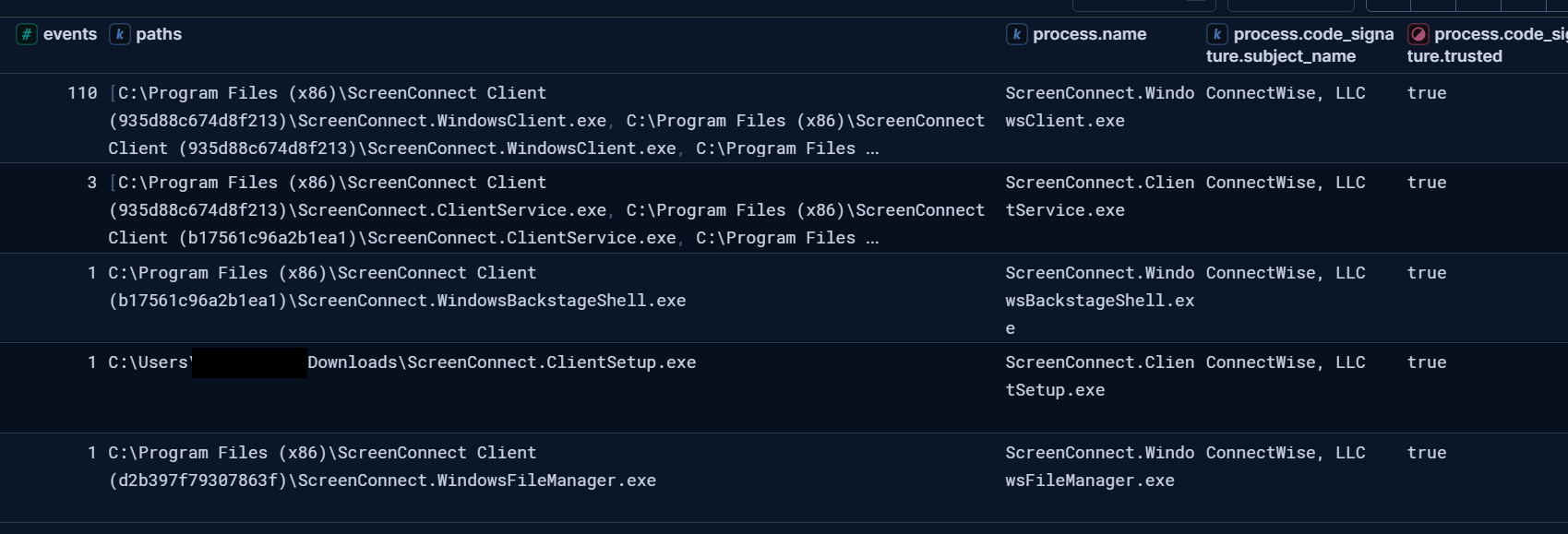
One predicate, five binaries, and trusted reads true on every row. That column is the argument.
Treat code_signature.trusted as an enrichment field to display, never as the discriminator. And resist the urge to add PE-metadata fallbacks next to it - I tried, and process.pe.company is null on every process event this stack has ever written. A leg that cannot fire does not widen a rule, it just hides how narrow the rule is.
3. The relay classifier, read off a sample you did not build
You can read cloud-trial versus self-hosted straight off the client’s own launch parameters and network destination, without building the client yourself.
Cloud / trial:
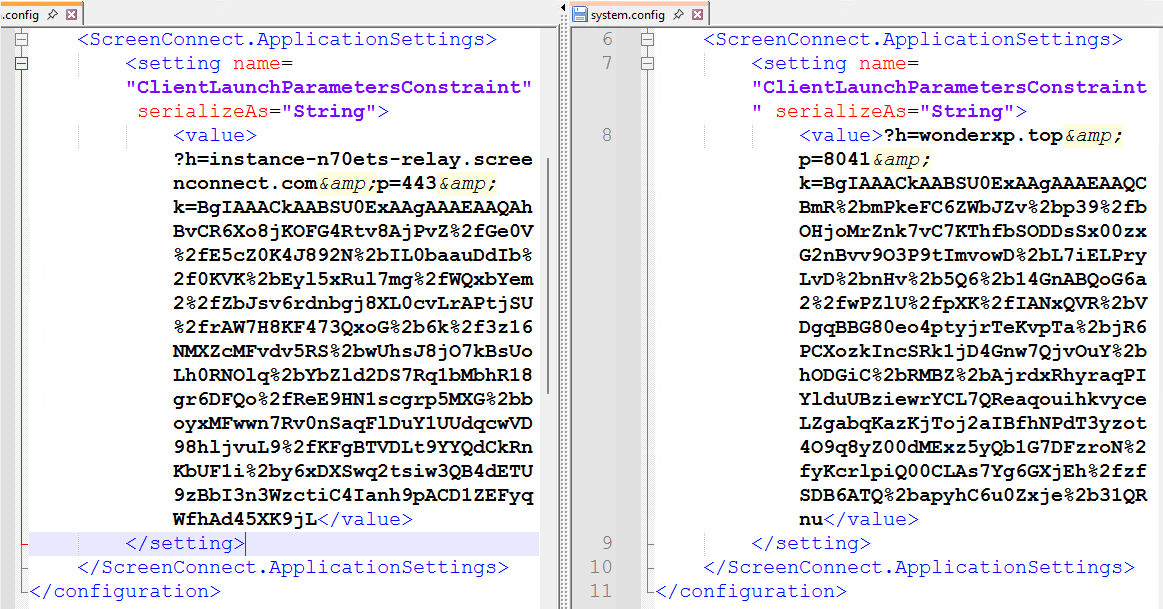
h=instance-<id>-relay.screenconnect.com, port443, a*.screenconnect.comDNS name, and a valid ConnectWise signature.Self-hosted / rogue: a bare IP or a foreign domain, typically on port
8041.
Sample 1 classified as cloud/trial from h=instance-fmjh7r-relay[.]screenconnect[.]com:443. Sample 2 dropped two implants. One cloud (instance-n70ets-relay[.]screenconnect[.]com:443, resolving to 51.79.41[.]235) and one self-hosted (wonderxp[.]top:8041, resolving to 103.60.12[.]75). The classifier read both correctly off a sample nobody in the lab constructed.
// ScreenConnect relay callback: cloud (443, *.screenconnect.com) vs self-hosted (8041 or a foreign host)
let lookback = 30d;
DeviceNetworkEvents
| where Timestamp > ago(lookback)
| where InitiatingProcessFileName =~ "ScreenConnect.ClientService.exe"
| where ActionType == "ConnectionSuccess"
| extend RelayModel = case(RemoteUrl matches regex @"(?i)instance-[a-z0-9]+-relay\.screenconnect\.com", "cloud/trial",
                           isnotempty(RemoteUrl) and RemoteUrl !endswith "screenconnect.com", "self-hosted",
                           RemotePort == 8041, "self-hosted",
                           "review")
| project Timestamp, DeviceName, InitiatingProcessCommandLine, RemoteUrl, RemoteIP, RemotePort, RelayModel
RelayModel column is the whole classifier. Two cloud/trial on 443, one self-hosted on 8041, and the command line carrying the h= value that decided each one.This is the only query in this piece that tells the two implants apart. Everything else here tells you a ScreenConnect client is present. The relay value tells you whose. It is also the one place a shipping rule caught the stage that mattered: Elastic’s Newly Observed ScreenConnect Host Server fired high on wonderxp[.]top, the only alert on either stack that flagged the self-hosted implant. Nothing in sample 1 could ever have triggered it, because sample 1 never left the official cloud.
The client’s own status pane corroborates the read with no telemetry at all: it prints relay://instance-<id>-relay.screenconnect.com:443/ on screen.
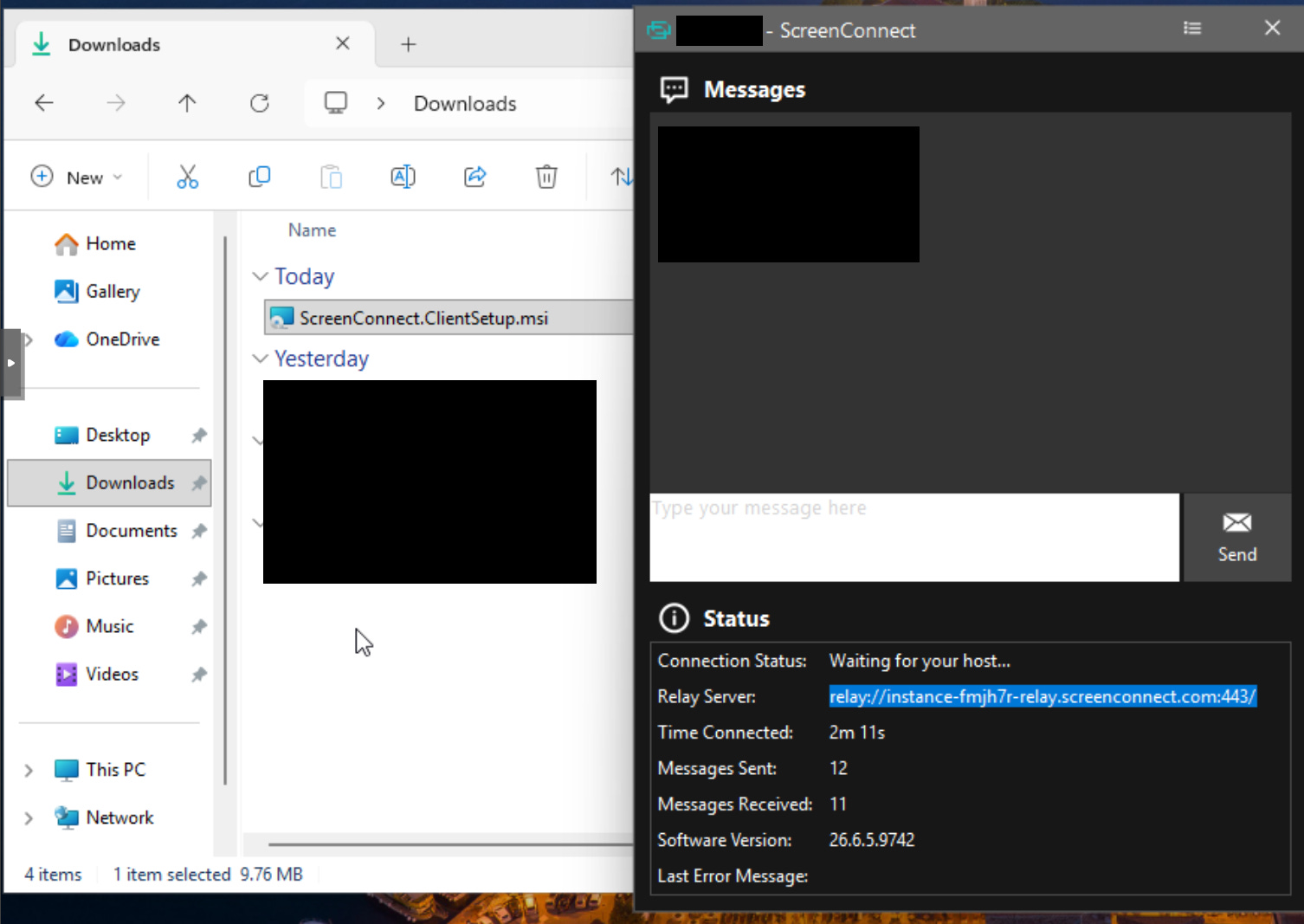
4. Anchor persistence on the launch string, not on a temp path
The research pointed at C:\Windows\SystemTemp\ScreenConnect\<version>\ as an install location. It is not one. The client installed under C:\Program Files (x86)\ScreenConnect Client (<thumbprint>)\ and the service registered there, so do not scope an install detection to SystemTemp. Do not write it off either: it turned out to be one of the best signals in the case, for a different reason. Empty on sample 1, populated on sample 2, and the difference was not the sample but whether an operator pushed a file.
The durable anchor is the service install. Both samples wrote an EID 7045 service named ScreenConnect Client (<thumbprint>), running as LocalSystem, auto-start. Sample 2 wrote two of them, nine minutes apart, and that count is the tell: ScreenConnect names each service after its instance thumbprint, so a second server means a second service sitting alongside the first. Remove the implant every alert fired on and the other one is still there, still set to auto-start. In Defender that lands in DeviceEvents as ActionType == "ServiceInstalled", with the service name in AdditionalFields.
If you have no EDR at all, Sysmon carries this on its own, and it is worth knowing exactly which events do the work. Two fire per implant, in this order:
Event ID 13,
RegistryEvent (Value Set). The service registration writesHKLM\System\CurrentControlSet\Services\ScreenConnect Client (<thumbprint>)\ImagePath, and that value carries the full launch string, relay and port included. One per implant, the same count-the-services tell from a different log.Event ID 22,
DNSEvent.ScreenConnect.ClientService.exeresolving its relay:instance-n70ets-relay[.]screenconnect[.]com, thenwonderxp[.]top.
The ordering is the useful part. The registry write beats the DNS lookup by about half a second in both cases, 17:01:01.252 before 17:01:01.782 and 17:09:44.914 before 17:09:45.811. The relay host is in the registry before the client has resolved it, so you can read the C2 destination off a host that never got its packet out. The registry write is T1543.003, Create or Modify System Process: Windows Service, and both events are there on any box running Sysmon.
Read the role off the client process, not off the service event:
// The e=Access&y=Guest role and the h= relay host live on the client process cmdline
let lookback = 30d;
DeviceProcessEvents
| where Timestamp > ago(lookback)
| where FileName =~ "ScreenConnect.ClientService.exe"
| where ProcessCommandLine has "y=Guest"
| project Timestamp, DeviceName, FileName, ProcessCommandLine, InitiatingProcessFileName
services.exe because they run as services.Access means an unattended-access role, which makes this persistence rather than a one-off support session, and it survives both install modes. One field carries both the persistence tell and the cloud-versus-self-hosted read, so read it in full rather than matching on it and discarding it.
5. The community Sigma rules already cover a lot of this
You do not have to write all of this yourself to get a first pass. I ran Hayabusa, a Sigma engine, over the collected event logs offline. Three SigmaHQ rules fired on the sample-2 telemetry, all medium:
Remote Access Tool - ScreenConnect Execution (
57bff678), on Sysmon 1. Catches the client running, and survives a rename because it keys on the binary’s own identity.Remote Access Tool - ScreenConnect Remote Command Execution - Hunting (
d1a401ab), on Sysmon 1 and Security 4688. This is the child-process angle.DNS Query To Remote Access Software Domain From Non-Browser App (
4d07b1f4). The non-browser exclusion is the clever part: Edge resolving the lure host is ignored, the service resolving its relay is not.
That is a real result against event logs you already collect, and it is portable: Sigma converts to whatever backend you run, so none of it is locked to the stack I happened to test on.
One caveat if you deploy it as-is. The Hunting rule matched roughly 210 helper-process hits on this one host. It is labelled a hunting rule and behaves like one: tune it before it goes anywhere near an alert queue.
The Backstage ancestry from the next section is not in the public ruleset yet. That is a rule worth writing, and I intend to contribute one.
The two stages: what gets in versus what they keep
Sample 2 is the one that changes how you hunt this tool.
The pattern itself is documented. Elastic’s SilentConnect write-up shows both branches, cloud and self-hosted, in one campaign, and Huntress describes exactly this stacking on one host: a rogue trial instance, a second the same day, then a third on a self-hosted relay days later, with FleetDeck as backup RMM. If you read one other thing on this, read that. What I can add is the compressed version, watched end to end: both implants on one host nine minutes apart, the second pushed through the first by a human visible in the process tree, and the difference between them still on disk afterwards.
The handoff, in order
The cloud client installs. The vendor-signed client you have met already, dialling
instance-n70ets-relay[.]screenconnect[.]comon 443.Four minutes later, a human takes the session. Not as a
cmd.exeorpowershell.exechild, which is what I had predicted and what most child-shell rules watch for. AsScreenConnect.WindowsBackstageShell.exe, spawned byScreenConnect.ClientService.exe. Backstage is ScreenConnect’s hidden shell: a full command environment with no window on the user’s desktop. A rule keyed on cmd or powershell would have watched the whole session happen and said nothing.The operator pushes a second installer. ScreenConnect’s
RunFilecommand drops it intoC:\Windows\SystemTemp\ScreenConnect\<version>\Temp\and runs it. That is the SystemTemp beat from earlier: not an install path, an operator staging path. A file written there and then executed means a human pushed something. Whether that human was authorised is the next question, and the file will not answer it.A second service registers, and that one dials
wonderxp[.]topon8041, a foreign domain on the classic self-hosted port.

ScreenConnect.ClientService.exe (SYSTEM) parenting ScreenConnect.WindowsBackstageShell.exe. This is the operator, and it is not a shell any cmd/powershell rule is looking at.The product logs the operator by name
One more place to look, and it is the cheapest evidence in this piece. ScreenConnect keeps its own Application event log, and it records the operator’s session by name. No EDR, no Sysmon, no query language. Just Windows Logs -> Application, filtered to source ScreenConnect.

scream care works on the cloud client, pushes the installer, then spacex7 connects on the self-hosted one & scream care drops off 18 seconds later.Three event IDs carry it:
100 / 101, a Host user connected and disconnected. The body names the operator’s own session label, the relay URL and the instance fingerprint. Here that is
scream careon the cloud implant andspacex7on the self-hosted one. Two different labels, so the second implant was not a copy of the first.201, files transferred.
Transferred files with action 'Run': ScreenConnect.ClientSetup (1).msi. That is the second implant pushed through the first, named, action stated, logged by the product.
It also corrected me. Every other source I had went quiet after 17:09:46, so I had the operator down as four and a half minutes of work. The Application log has spacex7 disconnecting at 17:17:46. Actual dwell was about twelve and a half minutes, and they logged off deliberately rather than dropping. I only found that because I went back for a log I had not collected the first time.
Every other source went quiet at 17:09:46. The product’s own log had the operator still working until 17:17:46. The difference between those two numbers is the difference between a four minute incident and a twelve minute one.
One caveat worth carrying: these events are suppressible. Hunt & Hackett showed in 2021 that patching one call out of the unsigned ScreenConnect.Core.dll with dnSpy silences every ScreenConnect event while the client keeps working. Treat them as strong corroboration, never as the thing you rely on.
Why two, and why one is disposable
The published answer is redundancy. Huntress puts it directly: stacking relays “ensures the attacker maintains access even if one relay is discovered and removed”, and they treat multiple ScreenConnect instances on one host, especially trial instances you did not deploy, as a strong indicator of compromise on its own. Microsoft, Acronis and others describe the same behaviour with different second tools: Tactical RMM, MeshAgent, FleetDeck. Remediate the implant your alert fired on, miss the other, and the intrusion continues. The economics agree. A trial instance is instant, free, correctly signed and on a domain plenty of estates already allowlist because real MSPs live there. It is disposable by design. A relay you own is not, and wonderxp[.]top had been running since April, which is not throwaway infrastructure.
What is on disk: a silent config and a fifteen-month-old build
My samples add a second reading, and it is an inference from one host rather than something the literature says: the two implants were not configured the same way. The self-hosted implant shipped an app.config that turns off every user-visible indicator, no tray icon, no “you are being controlled” banner, no connect toast. The cloud implant shipped no such file and ran the visible defaults. The signed client gets them in. The self-hosted one is what they keep, and that intent is on disk.
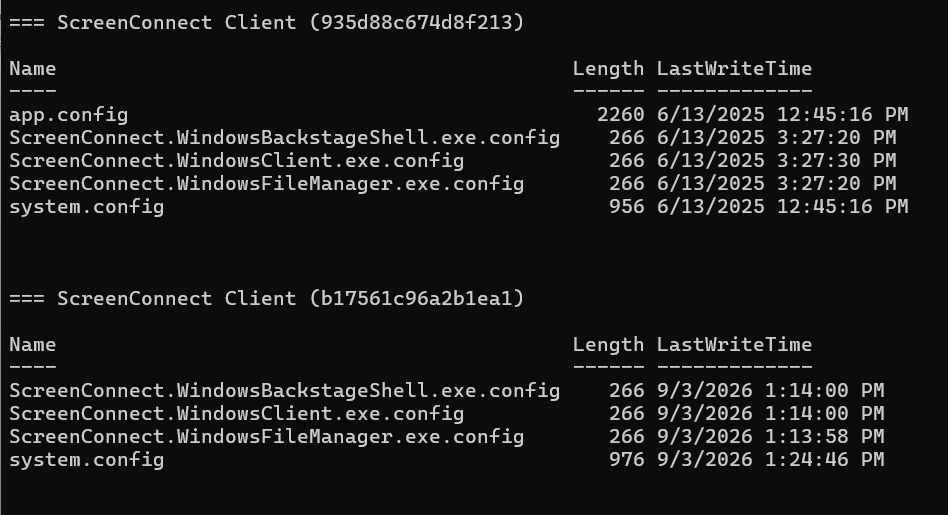
The second finding is in the timestamps. Both implants landed on the same host the same afternoon, but their files are not from the same era: the cloud client’s configs are stamped 3 September 2026, the self-hosted client’s 13 June 2025. Fifteen months apart in one directory listing.
The client that gets them in is whatever ConnectWise ships this week, built fresh from a trial instance on the day. The client they keep came from a self-hosted server nobody has rebuilt in over a year. Two consequences for the hunt:
The self-hosted binary will not match the hash or version of any current vendor release, so a rule pinned to what ScreenConnect ships today walks past the implant that matters.
A build that old is not disposable, the same conclusion
wonderxp[.]topsupports from the network side. The trial instance is meant to be burned. The other one is somebody’s kit.
On this sample, the stage the operator keeps is configured for silence. Whether every self-hosted build is assembled that way is not something one host can tell you. A hunt that stops at “is this the official ConnectWise cloud?” waves the first implant through and never sees the second.
Collect the box: the answers are still on disk
If your queries put a ScreenConnect client on a box behaving like an operator tool, the evidence is on disk, and the box will tell you every piece of infrastructure it was built to talk to.
system.configcarries theh=relay host,p=port and the RSA key launch constraint. Read the relay model straight off it, statically, without waiting for a callback.
The EID 7045 service names the thumbprint and holds the full launch string,
e=Access&y=Guestincluded.
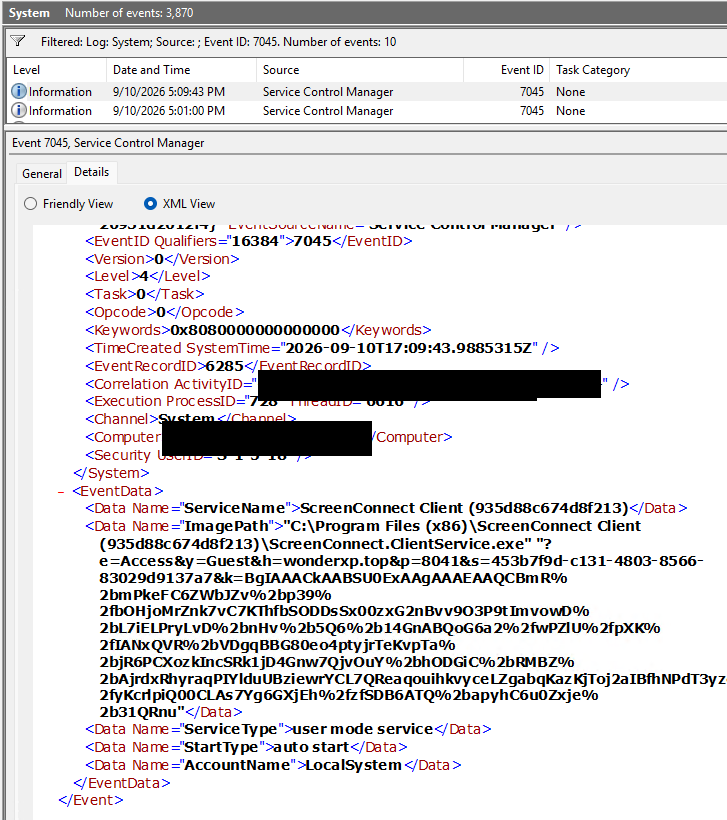
ImagePath carries role, relay, port, session ID and server key in a single field. Worth knowing which log you are reading: Defender’s own ServiceInstalled event does not carry this string, only the service name, type, start type and account.The infrastructure is never one host.
FileOriginUrlgives you the delivery instance (westville[.]screenconnect[.]comon sample 1,screamingacresmi[.]screenconnect[.]comon sample 2). The launch string and the network events give you the relay. Sample 1 named two hosts. Sample 2 named three, because the second implant addedwonderxp[.]topon8041. They look unrelated. Collect all of them before you block any of them.The operator’s traces.
ScreenConnect.WindowsBackstageShell.exeunder the service is your join, and anything underC:\Windows\SystemTemp\ScreenConnect\<version>\Temp\is what they staged. Pull the staged file before the box is reimaged. On sample 1 the relay held the session but no operator joined in the window, so absence here is a finding, not a failure.
Six checks, none of them a trust filter
An attacker does not need malware, a repack, or a stolen certificate to put a remote-access implant on your estate. A cloud instance and a lure are enough, and the client will be validly signed on arrival. So stop asking whether the binary is trusted.
Provenance:
DeviceFileEventswith a populatedFileOriginUrland a ScreenConnect filename or download host. Earliest signal you get, and Defender-only.Vendor identity, not trust: match
code_signature.subject_nameagainst an RMM vendor list. The valid signature is the catch, not the alibi.The relay model:
instance-<id>-relay.screenconnect.com:443is cloud/trial, a foreign host on8041is self-hosted, and a newly observed relay host is your high-severity signal.Persistence: the EID 7045 service image path containing
e=Access&y=Guest, not a temp path.Count the instances. More than one
ScreenConnect Client (<thumbprint>)service on a host you did not deploy to is an indicator on its own. Huntress says the same from their incident data, and it is the cheapest check on this list.Operator on the keyboard:
ScreenConnect.WindowsBackstageShell.exespawned by the service, plus a file written underC:\Windows\SystemTemp\ScreenConnect\*\Temp\and then executed. Correlate the two and you have the two-stage handoff, not a maybe.
If your estate does not run ScreenConnect and you see it, that alone is your investigation. If it does, the same evidence sorts a sanctioned MSP session from an attacker: one or two hosts instead of the fleet, a relay you did not sanction, an Access role you did not deploy.
Every KQL and ES|QL query in this issue is on GitHub so you can lift them in one go: github.com/Securityinbits/defender-hunt-queries.
The next analyst to see Uncommon remote access software in the queue will be tempted to read “remote access software,” think probably IT, and close it. The two samples say otherwise. One of them had a human on the keyboard four minutes later, and the implant that human left behind never raised that alert at all. Closing it does not close the incident. It just ends your half of it.
IoCs
Both are real, both were detonated in my own lab, and both are ConnectWise-signed. Initial download URL and SHA256:
Sample 1, the MSI off the
eventvenue[.]inklure:hxxps://westville[.]screenconnect[.]com/Bin/ScreenConnect.ClientSetup.msi?e=Access&y=Guestaf83740c821f78f517c7a738812340ccc31f34ab9b1dce69c268cb6d5114c6deSample 2, the EXE off the
parvellainsurance[.]comlure, the one that dropped two implants:hxxps://screamingacresmi[.]screenconnect[.]com/Bin/ScreenConnect.ClientSetup.exe?e=Access&y=Guest&t=special51afcda155489ac824f04f1a36aba49c5d5a4464180b82fc3c66e05bd7860769
P.S. This is the second deep dive in the RMM abuse series, after AnyDesk. The signature-versus-identity lesson generalises: match on what the tool IS, not on whether it is trusted.
If this was useful, forward it to whoever runs your alert queue. That is how the next defender finds it.